Centered paragraph.
``` The following must be applied to the individual text fields within the lesson. See the article on [markdowns](https://support.edapp.com/markdowns?hsLang=en) for more information. **Change Fonts** ``` body {font-family: "Calibri", sans-serif; }h1, h2, h3, h4, h5, h6 {font-family: "Calibri", sans-serif;}p {font-family: "Calibri", sans-serif; } ``` - This sets the font for content and headings to Calibri (without serif which is a style of text) - Custom fonts need to be hosted externally then imported. - h1, h2 etc refers to the headers. H1 is the biggest header, H2 is the second biggest etc. ### **Buttons** **Main buttons within the lesson** ``` .btn.btn-solid { color: #fff; border: 1px solid rgba(0,0,0,0.2); background-color: #FFCC33; background-clip: padding-box;} ``` 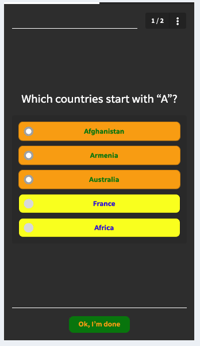**Secondary Buttons** ``` /*ok im done*/.btn.btn-muted { background-color: green; color:orange; border-radius: 10px;}/*selected buttons*/.selectable.active .btn { background: orange; color: green;}/*unselected buttons*/.btn.btn-solid { background-color: yellow; color:blue;} ``` 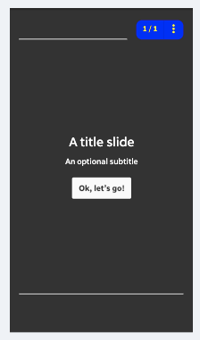 **Menu button on the top right** ``` /*slide number box top right*/#lesson-header-nav{ background: blue; color: yellow; border-radius:10px;} ``` ### Progress bar colour ``` #indicator { color: #803d9a; background-color: rgba(0, 0, 0, 0.20);} ``` This refers to the bar at the top of the lesson as you progress through completion.  ### Takeaway pop-up ``` #slide-answer { border-bottom: 20px solid #000; border-top: 4px solid #000; color: #fff; background-color: #FFCC33; background-image: none;} ``` #### **CSS Properties** **background** *all background properties in one declaration* **background-color** *background color* **background-image** *background image* **border-style** *ADD dotted, dashed, solid, double, groove, ridge, inset, outset* **border-bottom-color** *color of the bottom border* *(bottom can be replaced with "left" "right" or "top")* **border-color** *border color* **border-width** *border width* **border-radius** *roundness of corners (0px is right angles) (use percentages to make oval-shaped)* **box-shadow** *creates shadow from element ex (10px 10px grey;)* **color** *text color* **display: inline-block** *make a block around text (like Image Slider)* **filter** *image effects: grayscale, blur, invert etc.* **font** *all font properties in one line* **@font-face** *declare non-web-safe fonts* **font-family** *font of the element* **font-size** *font size* **font-stretch** *widen or narrow text* **font-style** *font style: normal, italic, oblique* **font-weight** *use bold or thin characters* **height** *height of the element* **justify-content** *justifies flexible container's items horizontally if necessary* **letter-spacing** *space between characters* **linear-gradient** *(angle, color-stop1, color-stop2)ex. (to right, orange, black) (use with BGimage)* **line-height** *line height of text or inline-block elements* **list-style** *all list properties in one line* **opacity** *transparency level of an element* **padding** *padding between the element border and content* **padding-bottom** *padding bottom* *(bottom can be replaced with "left" "right" or "top")* **text-align** *horizontal alignment of text* **vertical-align** *vertical alignment* For further reading on CSS and more info about what each of the above properties target check out: [https://www.w3schools.com/css/default.asp](https://www.w3schools.com/css/default.asp) - [Getting started](https://support.edapp.com/getting-started?hsLang=en#main-content) - [Get Started in 5 Minutes](https://support.edapp.com/getting-started?hsLang=en#get-started-in-5-minutes) - [Lessons & Courses](https://support.edapp.com/getting-started?hsLang=en#lessons-courses) - [Basic User Management](https://support.edapp.com/getting-started?hsLang=en#basic-user-management) - [Course Library](https://support.edapp.com/getting-started?hsLang=en#course-library) - [Definitions](https://support.edapp.com/getting-started?hsLang=en#definitions) - [Admin portal](https://support.edapp.com/admin-portal?hsLang=en#main-content) - [Advanced User Management](https://support.edapp.com/admin-portal?hsLang=en#advanced-user-management) - [Lesson Management](https://support.edapp.com/admin-portal?hsLang=en#lesson-management) - [Course Management](https://support.edapp.com/admin-portal?hsLang=en#course-management) - [App Customisation](https://support.edapp.com/admin-portal?hsLang=en#app-customisation) - [Peer Learning](https://support.edapp.com/admin-portal?hsLang=en#peer-learning) - [Engagement](https://support.edapp.com/admin-portal?hsLang=en#engagement) - [Analytics](https://support.edapp.com/admin-portal?hsLang=en#analytics) - [Features](https://support.edapp.com/admin-portal?hsLang=en#features) - [EducateAll](https://support.edapp.com/admin-portal?hsLang=en#educateall) - [Sharing Content](https://support.edapp.com/admin-portal?hsLang=en#sharing-content) - [Integrations](https://support.edapp.com/admin-portal?hsLang=en#integrations) - [Learner's app](https://support.edapp.com/learners-app?hsLang=en#main-content) - [Logging In](https://support.edapp.com/learners-app?hsLang=en#logging-in) - [Taking Courses](https://support.edapp.com/learners-app?hsLang=en#taking-courses) - [Features For Learners](https://support.edapp.com/learners-app?hsLang=en#features-for-learners) - [Extras](https://support.edapp.com/learners-app?hsLang=en#extras) - [Star Bar](https://support.edapp.com/learners-app?hsLang=en#star-bar) - [Creator Tool](https://support.edapp.com/creator-tool?hsLang=en#main-content) - [Branding](https://support.edapp.com/creator-tool?hsLang=en#branding) - [Templates](https://support.edapp.com/creator-tool?hsLang=en#templates) - [Course & Lesson Configurations](https://support.edapp.com/creator-tool?hsLang=en#course-lesson-configurations) - [Copying Slides/Lessons/Courses](https://support.edapp.com/creator-tool?hsLang=en#copying-slides-lessons-courses) - [Translations](https://support.edapp.com/creator-tool?hsLang=en#translations) - [Content](https://support.edapp.com/creator-tool?hsLang=en#content) - [Tips and tricks](https://support.edapp.com/tips-and-tricks?hsLang=en#main-content) - [Learning Programme Management](https://support.edapp.com/tips-and-tricks?hsLang=en#learning-programme-management) - [Authoring](https://support.edapp.com/tips-and-tricks?hsLang=en#authoring) - [Best Practices](https://support.edapp.com/tips-and-tricks?hsLang=en#best-practices) - [Programme Success](https://support.edapp.com/tips-and-tricks?hsLang=en#programme-success) - [Engagement](https://support.edapp.com/tips-and-tricks?hsLang=en#engagement) - [Launch Kit](https://support.edapp.com/tips-and-tricks?hsLang=en#launch-kit) - [FAQ](https://support.edapp.com/faq?hsLang=en#main-content) - [Lessons & Courseware](https://support.edapp.com/faq?hsLang=en#lessons-courseware) - [Authoring](https://support.edapp.com/faq?hsLang=en#authoring) - [User Registration & Management](https://support.edapp.com/faq?hsLang=en#user-registration-management) - [Display](https://support.edapp.com/faq?hsLang=en#display) - [Engagement](https://support.edapp.com/faq?hsLang=en#engagement) - [Peer Learning](https://support.edapp.com/faq?hsLang=en#peer-learning) - [Knowledge Performance](https://support.edapp.com/faq?hsLang=en#knowledge-performance) - [Analytics](https://support.edapp.com/faq?hsLang=en#analytics) - [System & Technical Support](https://support.edapp.com/faq?hsLang=en#system-technical-support) - [Subscriptions & Pricing](https://support.edapp.com/faq?hsLang=en#subscriptions-pricing) - [Educate All](https://support.edapp.com/faq?hsLang=en#educate-all) - [Contact & Support](https://support.edapp.com/faq?hsLang=en#contact-support) - [Webinars](https://support.edapp.com/webinars?hsLang=en) - [Technical / API documentation](https://support.edapp.com/technical-api-documentation?hsLang=en#main-content) - [Single Sign On for the Learner's Portal](https://support.edapp.com/technical-api-documentation?hsLang=en#single-sign-on-for-the-learners-portal) - [Single Sign-on for Admin Portal](https://support.edapp.com/technical-api-documentation?hsLang=en#single-sign-on-for-admin-portal) - [Integrations](https://support.edapp.com/technical-api-documentation?hsLang=en#integrations) - [API](https://support.edapp.com/technical-api-documentation?hsLang=en#api) - [Legal documentation](https://support.edapp.com/legal-documentation?hsLang=en#main-content) - [Third Party Gateway](https://support.edapp.com/legal-documentation?hsLang=en#third-party-gateway) - [Privacy & Terms](https://support.edapp.com/legal-documentation?hsLang=en#privacy-terms) - [Troubleshooting](https://support.edapp.com/troubleshooting?hsLang=en) - [EdApp to SC Migration](https://support.edapp.com/edapp-to-sc-migration?hsLang=en) - [Default HubSpot Blog](https://edapp-5741180.hs-sites.com/blog) [](http://edapp.com) EdApp Help Center