---
title: Invite Users to EdApp via invite links
description: Learners can be invited in multiple ways. Invite links are great for sharing access to your program via your own communication channels or extending access beyond your own organization.
---
[Skip to content](https://support.edapp.com/invite-links#main-content)
English
Show submenu for translations
![EdApp - logo dark mode-1.png\]](https://support.edapp.com/hs-fs/hubfs/EdApp%20-%20logo%20dark%20mode-1.png?height=40&name=EdApp%20-%20logo%20dark%20mode-1.png)
- [Default HubSpot Blog](https://edapp-5741180.hs-sites.com/blog)
Open main navigation
Close main navigation
- [Default HubSpot Blog](https://edapp-5741180.hs-sites.com/blog)
- English
Show submenu for translations
- [edapp.com](https://www.edapp.com/)
[edapp.com](https://www.edapp.com/)
Hello. How can we help you?
- There are no suggestions because the search field is empty.
1. [Help Center](https://support.edapp.com/?hsLang=en)
2. [Getting started](https://support.edapp.com/getting-started?hsLang=en)
3. [Basic User Management](https://support.edapp.com/getting-started?hsLang=en#basic-user-management)
# Invite Users to EdApp via invite links
## Learners can be invited in multiple ways. Invite links are great for sharing access to your program via your own communication channels or extending access beyond your own organization.
Invite links can be used in two ways. Admins can create invite links for the whole account or for a user group. The other way is [inviting users via bulk email](https://support.edapp.com/invite-a-user-to-edapp-via-email/bulk-upload?hsLang=en).
#### **Contents**
[Account-wide Invite Links](https://support.edapp.com/invite-links#universal)
[Settings](https://support.edapp.com/invite-links#settings)
[Custom Logo](https://support.edapp.com/invite-links#registration-logo)
[Manual Codes](https://support.edapp.com/invite-links#manualcodeinput)
[User group Invite Links](https://support.edapp.com/invite-links#usergroup)
[Verification](https://support.edapp.com/invite-links#verification)
Please see this article for troubleshooting
This only applies to learners who have not already registered to EdApp previously.
### **Account-wide Invite Links**
#### **Step 1: Navigate to 'Invite Users' via the Users tab**
****
#### **Step 2: Copy the auto-generated invite link or download the QR code to distribute to all users to grant them access to the account.**
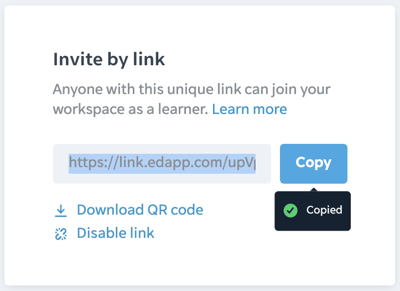
Invite links are automatically generated and are unique to each account.
When the user registers, the Admin can decide what information they are required to fill out via the [registration fields](https://support.edapp.com/custom-fields?hsLang=en).
### Settings
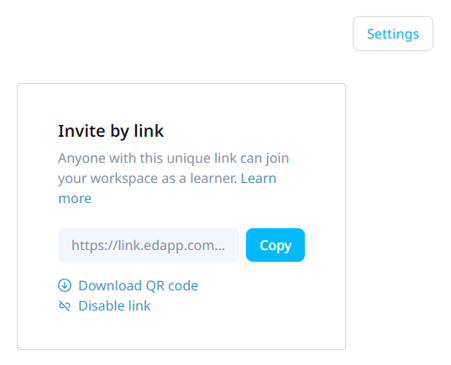
You can see more registration options by navigating to *Settings* in the top right corner
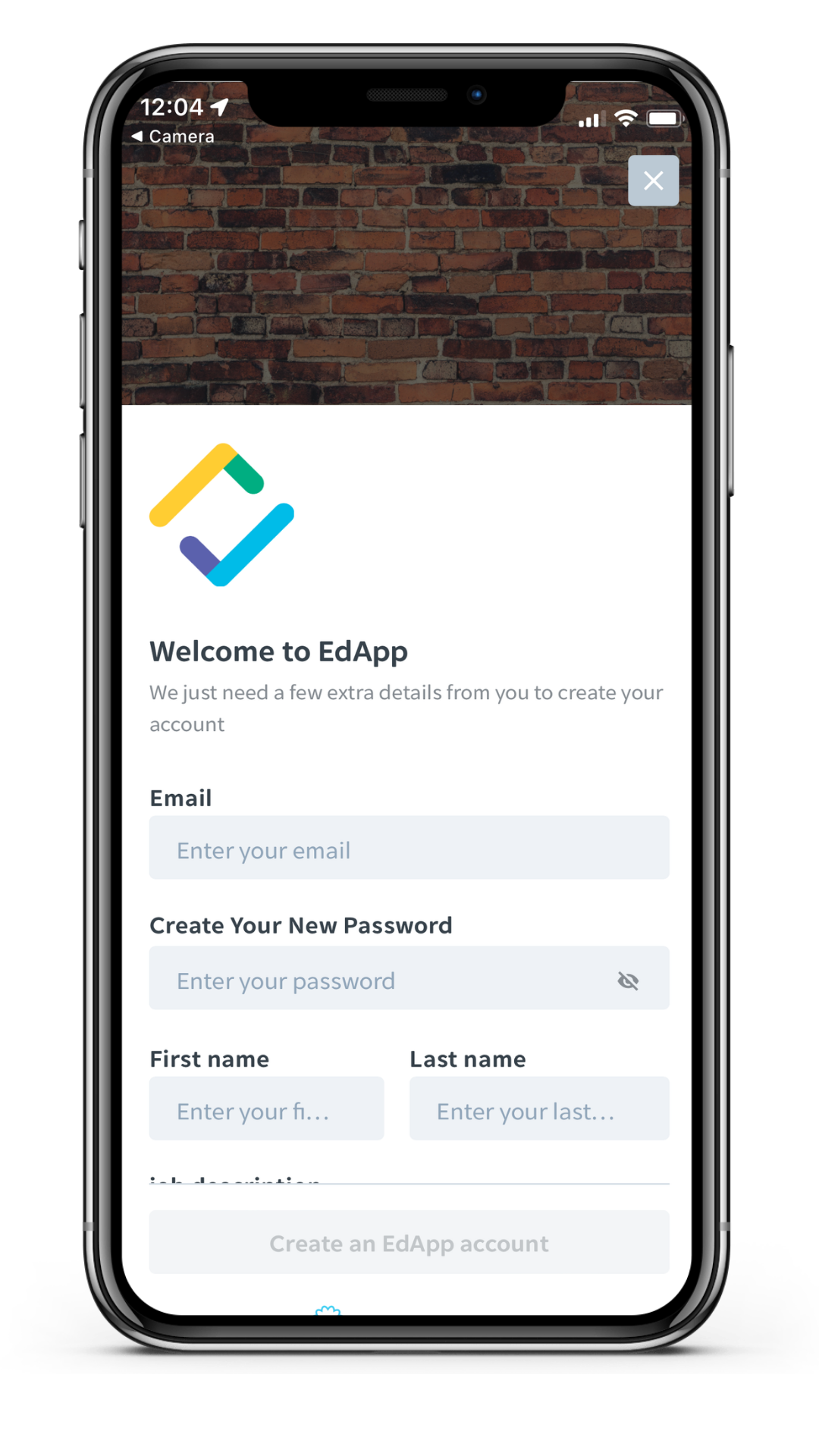
#### Registration Branding - Logo & Background
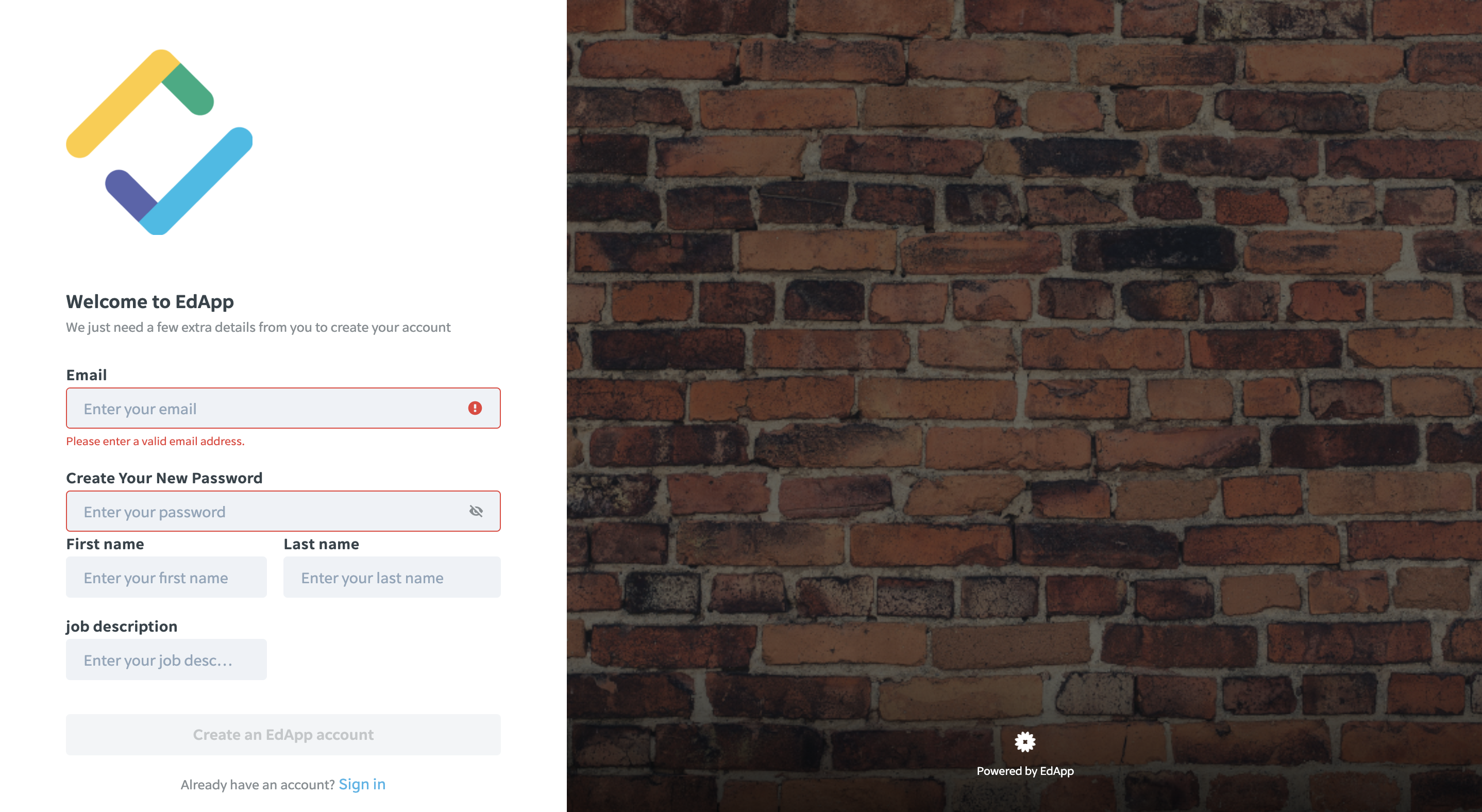
You can upload a custom logo and background to the registration page. This will be seen by your learners upon signing up. Tick the box with 'display custom logo' and upload your logo and background.
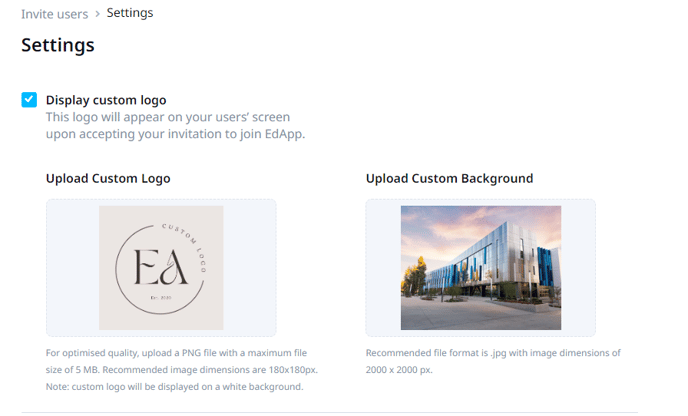
*Registration Screen on a web browser.*
#### Manual Code Input
Manual code input will no longer be available starting February 2023. Existing custom invite codes will still work.
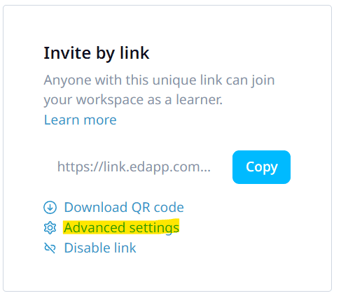
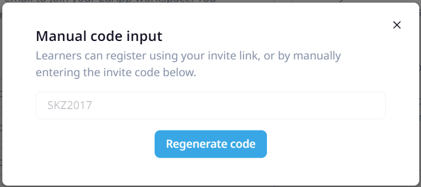
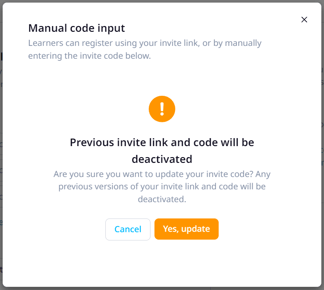
By navigating to "Advanced Settings" in the Invite by link box on the Invite Users Page, an Admin can regenerate an Invite Code for their learners to use.
#### Verification
Admins have the capability to decide if the user needs to be verified before access is granted.
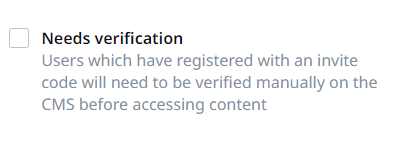
**How it works:**
Once a user registers with the provided invite link, they get this message:
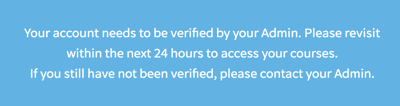
The admin then needs to log in to verify the user via **Users** \> **Users**:
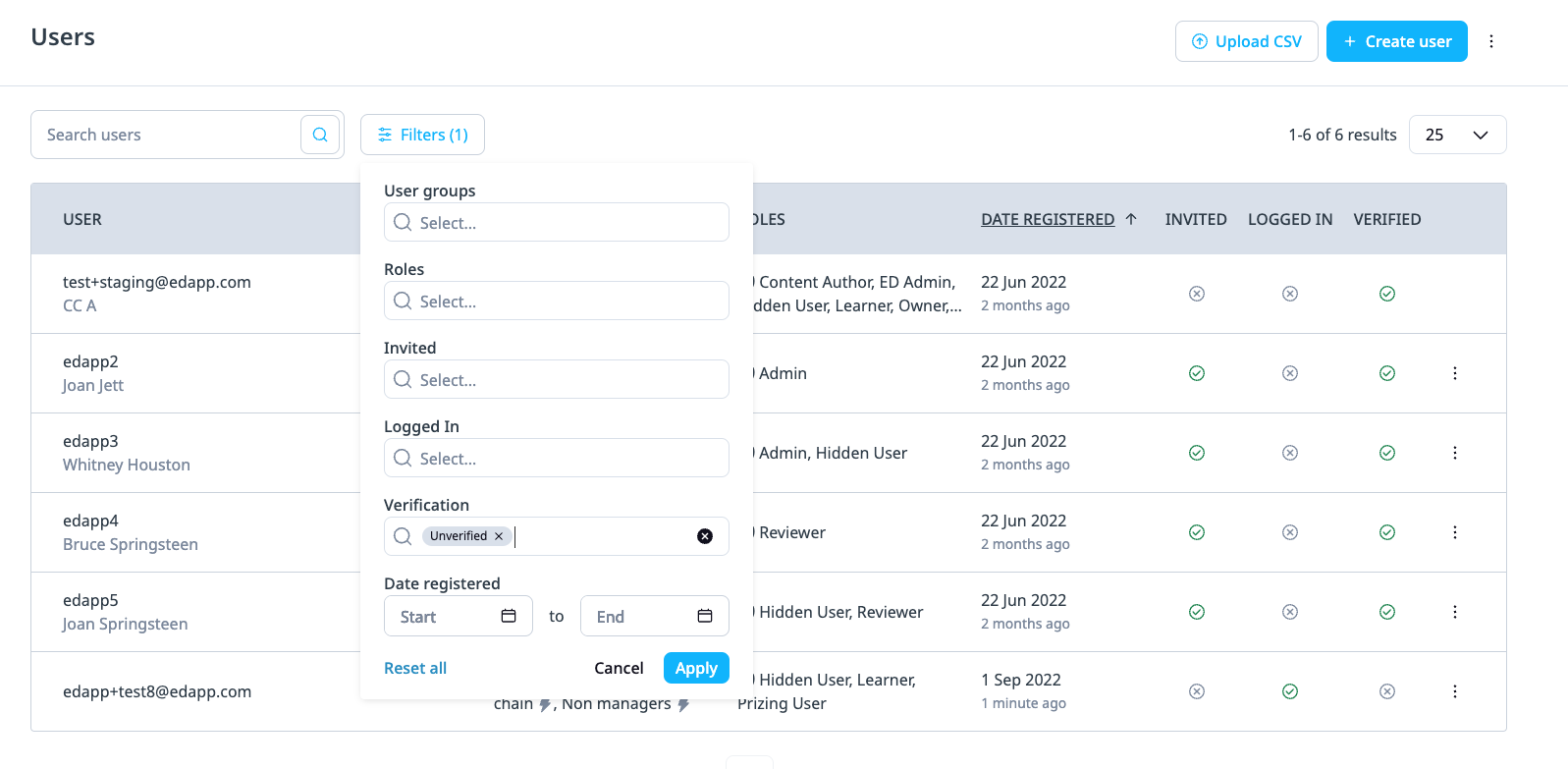
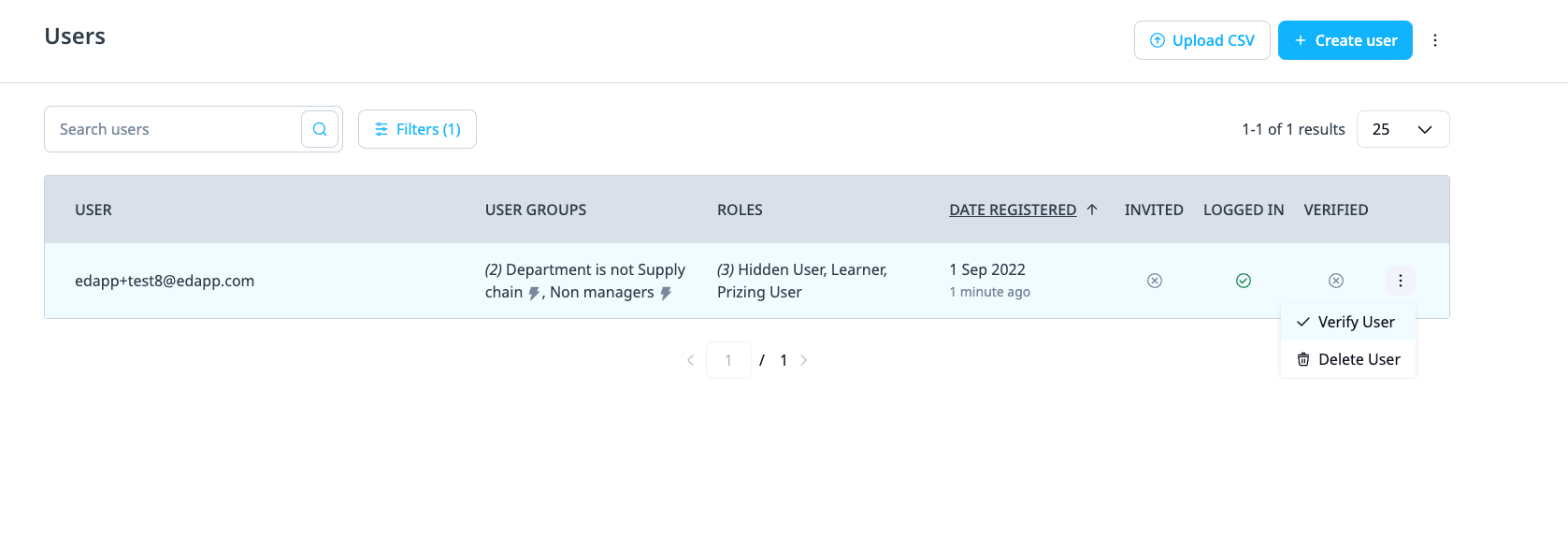
You can filter to '**Only Pending**' to see a list of all unverified users
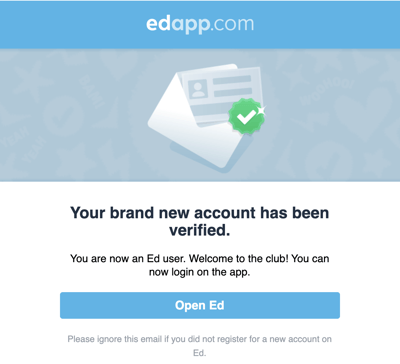
The user will then receive an email confirmation and are ready to access your assigned courses:
****
Only recommended for smaller accounts with very sensitive information
### **Set an invite link for a specific user group.**
User Group invite links are only available on EdApp pro plans.
User group invite links are arranged on a user group level during set-up or through user group editing. Admins can use a uniquely generated invite link that is specific to this user group.
When the link takes a learner to their login screen, the learners are automatically assigned to this user group. Admins are also able to verify users for these invite links.
#### **Step 1: Navigate to 'User Groups'**

#### Step 2: Create or select an existing user group

Step 3: Name the group and select "**Save"**
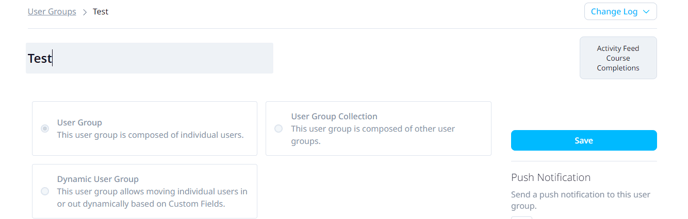
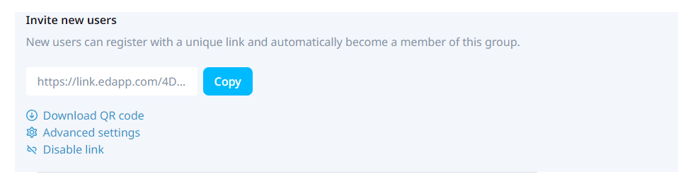
Then scroll down to the '**Invite new users**' section to see the invite link for this user group that is automatically generated. Copy the link or download the QR code and distribute to learners in order to grant them access to the user group.
Please note that you can only add users with emails that aren't registered with existing EdApp accounts yet. We only allow the association of one email address per EdApp platform/account. More about troubleshooting invites and registrations [HERE](https://support.edapp.com/troubleshooting-registration-and-invitations?hsLang=en).
- [Getting started](https://support.edapp.com/getting-started?hsLang=en#main-content)
- [Get Started in 5 Minutes](https://support.edapp.com/getting-started?hsLang=en#get-started-in-5-minutes)
- [Lessons & Courses](https://support.edapp.com/getting-started?hsLang=en#lessons-courses)
- [Basic User Management](https://support.edapp.com/getting-started?hsLang=en#basic-user-management)
- [Course Library](https://support.edapp.com/getting-started?hsLang=en#course-library)
- [Definitions](https://support.edapp.com/getting-started?hsLang=en#definitions)
- [Admin portal](https://support.edapp.com/admin-portal?hsLang=en#main-content)
- [Advanced User Management](https://support.edapp.com/admin-portal?hsLang=en#advanced-user-management)
- [Lesson Management](https://support.edapp.com/admin-portal?hsLang=en#lesson-management)
- [Course Management](https://support.edapp.com/admin-portal?hsLang=en#course-management)
- [App Customisation](https://support.edapp.com/admin-portal?hsLang=en#app-customisation)
- [Peer Learning](https://support.edapp.com/admin-portal?hsLang=en#peer-learning)
- [Engagement](https://support.edapp.com/admin-portal?hsLang=en#engagement)
- [Analytics](https://support.edapp.com/admin-portal?hsLang=en#analytics)
- [Features](https://support.edapp.com/admin-portal?hsLang=en#features)
- [EducateAll](https://support.edapp.com/admin-portal?hsLang=en#educateall)
- [Sharing Content](https://support.edapp.com/admin-portal?hsLang=en#sharing-content)
- [Integrations](https://support.edapp.com/admin-portal?hsLang=en#integrations)
- [Learner's app](https://support.edapp.com/learners-app?hsLang=en#main-content)
- [Logging In](https://support.edapp.com/learners-app?hsLang=en#logging-in)
- [Taking Courses](https://support.edapp.com/learners-app?hsLang=en#taking-courses)
- [Features For Learners](https://support.edapp.com/learners-app?hsLang=en#features-for-learners)
- [Extras](https://support.edapp.com/learners-app?hsLang=en#extras)
- [Star Bar](https://support.edapp.com/learners-app?hsLang=en#star-bar)
- [Creator Tool](https://support.edapp.com/creator-tool?hsLang=en#main-content)
- [Branding](https://support.edapp.com/creator-tool?hsLang=en#branding)
- [Templates](https://support.edapp.com/creator-tool?hsLang=en#templates)
- [Course & Lesson Configurations](https://support.edapp.com/creator-tool?hsLang=en#course-lesson-configurations)
- [Copying Slides/Lessons/Courses](https://support.edapp.com/creator-tool?hsLang=en#copying-slides-lessons-courses)
- [Translations](https://support.edapp.com/creator-tool?hsLang=en#translations)
- [Content](https://support.edapp.com/creator-tool?hsLang=en#content)
- [Tips and tricks](https://support.edapp.com/tips-and-tricks?hsLang=en#main-content)
- [Learning Programme Management](https://support.edapp.com/tips-and-tricks?hsLang=en#learning-programme-management)
- [Authoring](https://support.edapp.com/tips-and-tricks?hsLang=en#authoring)
- [Best Practices](https://support.edapp.com/tips-and-tricks?hsLang=en#best-practices)
- [Programme Success](https://support.edapp.com/tips-and-tricks?hsLang=en#programme-success)
- [Engagement](https://support.edapp.com/tips-and-tricks?hsLang=en#engagement)
- [Launch Kit](https://support.edapp.com/tips-and-tricks?hsLang=en#launch-kit)
- [FAQ](https://support.edapp.com/faq?hsLang=en#main-content)
- [Lessons & Courseware](https://support.edapp.com/faq?hsLang=en#lessons-courseware)
- [Authoring](https://support.edapp.com/faq?hsLang=en#authoring)
- [User Registration & Management](https://support.edapp.com/faq?hsLang=en#user-registration-management)
- [Display](https://support.edapp.com/faq?hsLang=en#display)
- [Engagement](https://support.edapp.com/faq?hsLang=en#engagement)
- [Peer Learning](https://support.edapp.com/faq?hsLang=en#peer-learning)
- [Knowledge Performance](https://support.edapp.com/faq?hsLang=en#knowledge-performance)
- [Analytics](https://support.edapp.com/faq?hsLang=en#analytics)
- [System & Technical Support](https://support.edapp.com/faq?hsLang=en#system-technical-support)
- [Subscriptions & Pricing](https://support.edapp.com/faq?hsLang=en#subscriptions-pricing)
- [Educate All](https://support.edapp.com/faq?hsLang=en#educate-all)
- [Contact & Support](https://support.edapp.com/faq?hsLang=en#contact-support)
- [Webinars](https://support.edapp.com/webinars?hsLang=en)
- [Technical / API documentation](https://support.edapp.com/technical-api-documentation?hsLang=en#main-content)
- [Single Sign On for the Learner's Portal](https://support.edapp.com/technical-api-documentation?hsLang=en#single-sign-on-for-the-learners-portal)
- [Single Sign-on for Admin Portal](https://support.edapp.com/technical-api-documentation?hsLang=en#single-sign-on-for-admin-portal)
- [Integrations](https://support.edapp.com/technical-api-documentation?hsLang=en#integrations)
- [API](https://support.edapp.com/technical-api-documentation?hsLang=en#api)
- [Legal documentation](https://support.edapp.com/legal-documentation?hsLang=en#main-content)
- [Third Party Gateway](https://support.edapp.com/legal-documentation?hsLang=en#third-party-gateway)
- [Privacy & Terms](https://support.edapp.com/legal-documentation?hsLang=en#privacy-terms)
- [Troubleshooting](https://support.edapp.com/troubleshooting?hsLang=en)
- [EdApp to SC Migration](https://support.edapp.com/edapp-to-sc-migration?hsLang=en)
- [Default HubSpot Blog](https://edapp-5741180.hs-sites.com/blog)
[](http://edapp.com)
EdApp Help Center
Copyright © 2026, EdApp Pty Ltd
```json
{
"@context" : "https://schema.org",
"@type" : "VideoObject",
"contentUrl" : "https://5741180.fs1.hubspotusercontent-na1.net/hubfs/5741180/PowerPoint%20Upload.mp4",
"dateModified" : "2023-05-12T01:06:02.174Z",
"duration" : "PT37S",
"height" : 1080,
"name" : "PowerPoint Upload",
"thumbnailUrl" : "https://5741180.fs1.hubspotusercontent-na1.net/hubfs/5741180/PowerPoint%20Upload.mp4/medium.jpg",
"uploadDate" : "2023-05-12T01:05:54.030Z",
"width" : 1920
}
```
```json
{
"@context" : "https://schema.org",
"@type" : "VideoObject",
"contentUrl" : "https://5741180.fs1.hubspotusercontent-na1.net/hubfs/5741180/Untitled%20design.mp4",
"dateModified" : "2022-08-12T03:46:10.108Z",
"duration" : "PT1M12.458S",
"height" : 1080,
"name" : "Untitled design",
"thumbnailUrl" : "https://5741180.fs1.hubspotusercontent-na1.net/hubfs/5741180/Untitled%20design.mp4/medium.jpg",
"uploadDate" : "2022-08-12T03:44:42.779Z",
"width" : 1920
}
```