---
title: Markdowns
description: Markdowns seem scary initially but think of them as a 'shortcut' to changing the style of your text.
---
[Skip to content](https://support.edapp.com/markdowns#main-content)
English
Show submenu for translations
![EdApp - logo dark mode-1.png\]](https://support.edapp.com/hs-fs/hubfs/EdApp%20-%20logo%20dark%20mode-1.png?height=40&name=EdApp%20-%20logo%20dark%20mode-1.png)
- [Default HubSpot Blog](https://edapp-5741180.hs-sites.com/blog)
Open main navigation
Close main navigation
- [Default HubSpot Blog](https://edapp-5741180.hs-sites.com/blog)
- English
Show submenu for translations
- [edapp.com](https://www.edapp.com/)
[edapp.com](https://www.edapp.com/)
Hello. How can we help you?
- There are no suggestions because the search field is empty.
1. [Help Center](https://support.edapp.com/?hsLang=en)
2. [Creator Tool](https://support.edapp.com/creator-tool?hsLang=en)
3. [Branding](https://support.edapp.com/creator-tool?hsLang=en#branding)
# Markdowns
## Markdowns seem scary initially but think of them as a 'shortcut' to changing the style of your text.
**Content**
[Bold](https://support.edapp.com/markdowns#bold)
[Italicize](https://support.edapp.com/markdowns#italic)
[Strikethrough](https://support.edapp.com/markdowns#strike)
[Underline](https://support.edapp.com/markdowns#underline)
[Font size](https://support.edapp.com/markdowns#fontsize)
[Lists](https://support.edapp.com/markdowns#list)
[Align](https://support.edapp.com/markdowns#alignment)
[Superscripts](https://support.edapp.com/markdowns#superscript)
[Line breaks](https://support.edapp.com/markdowns#linebreak)
[Image Insert](https://support.edapp.com/markdowns#image-insert)
[Code View](https://support.edapp.com/markdowns#Code-view)
Markdowns is a lightweight language with plain-text formatting used to change the styling of your text within the EdApp Creator Tool.
Any additional styling requires [Custom CSS](https://support.edapp.com/custom-css?hsLang=en) recommended for advanced authors only.
#### Bold text by putting two asterisks around the text
```
EdApp is a **mobile first** learning solution
```
EdApp is a **mobile first** learning solution
#### **Italicize** by putting one asterisk around the text
```
EdApp is a *mobile first* learning solution
```
EdApp is a *mobile first* learning solution
#### **Strikethrough text** by using two tildes (~) on either side of the sentence
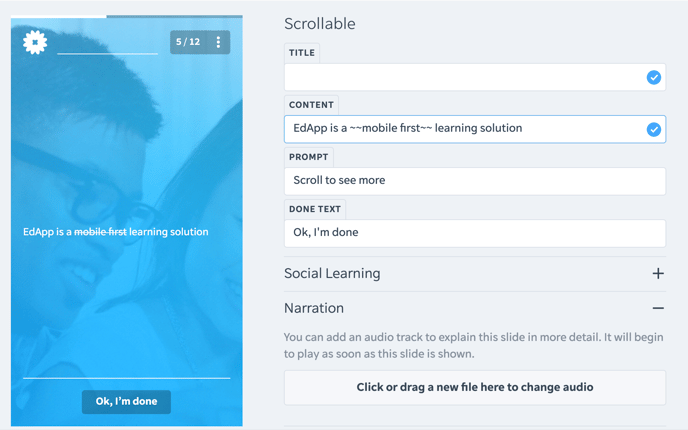
**Pro Tip**: If you want to add asterisks (\*) or tildes (~) to your text but don't want to make them appear bold, italicized, or strikethrough, you need to **Enable Code View** first and then add a **backslash (/)** before the symbol.
For example: \/\*\*ignore bold markdown\*\*\
#### **Underline text**
```
ENTER YOUR TEXT HERE
```
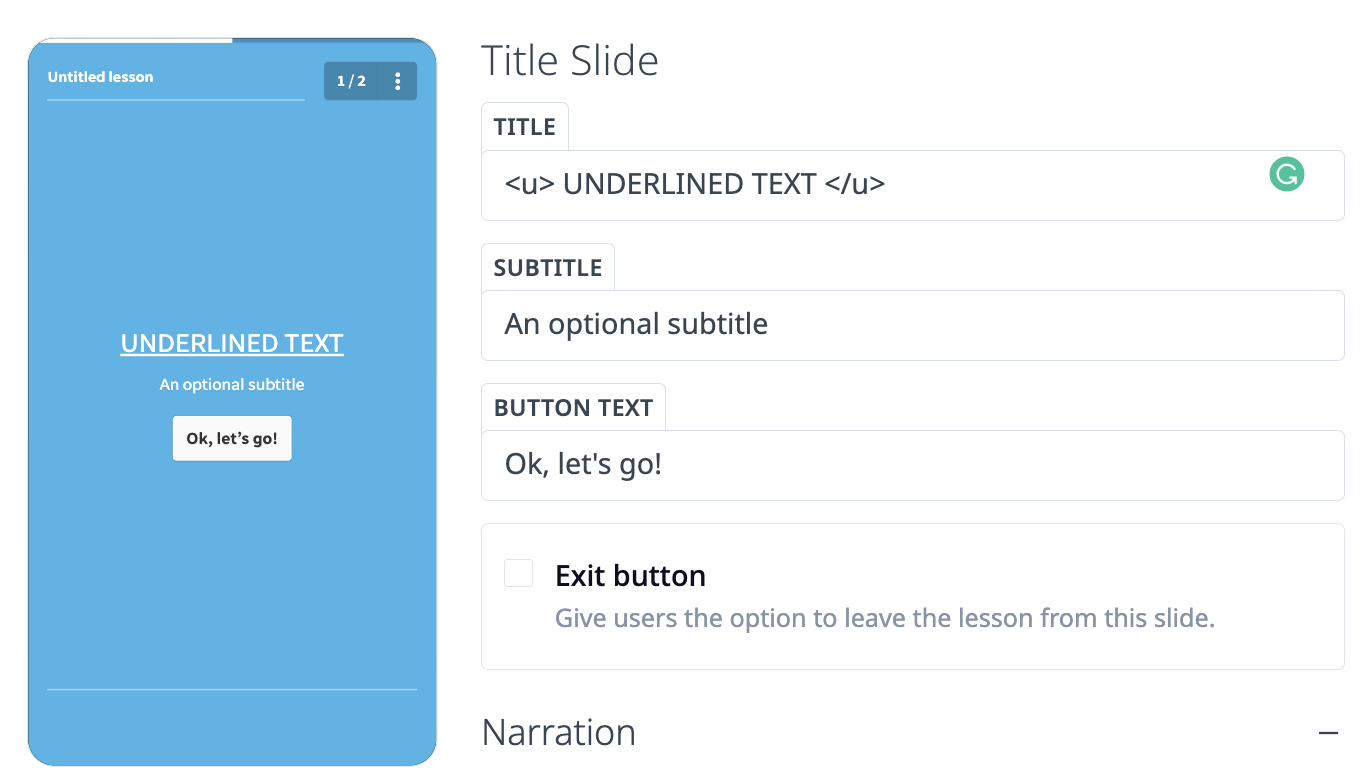
#### **Change the font size** by putting a hashtag (#) before the sentence.
Depending on how many you input, this will vary the size of the text.
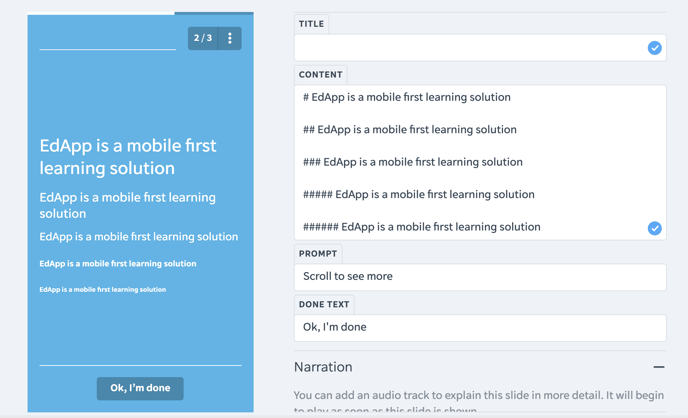
You can also use the following to specify the size:
```
YOUR TEXT HERE
```
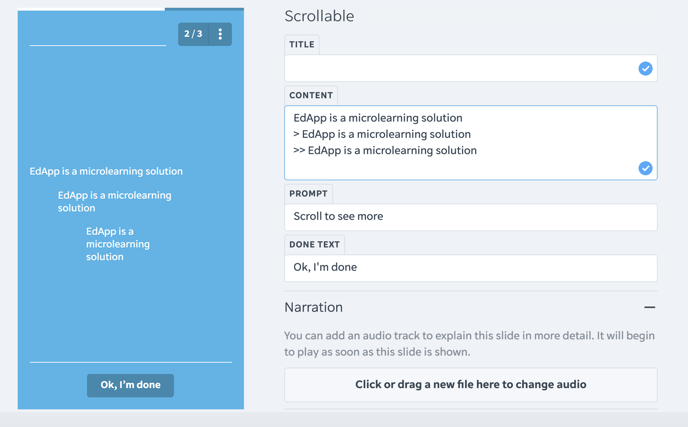
#### **Indent text by using a** greater-than sign (\>) before the sentence.
Depending on how many you put, this will vary the indentation.
#### **Lists**
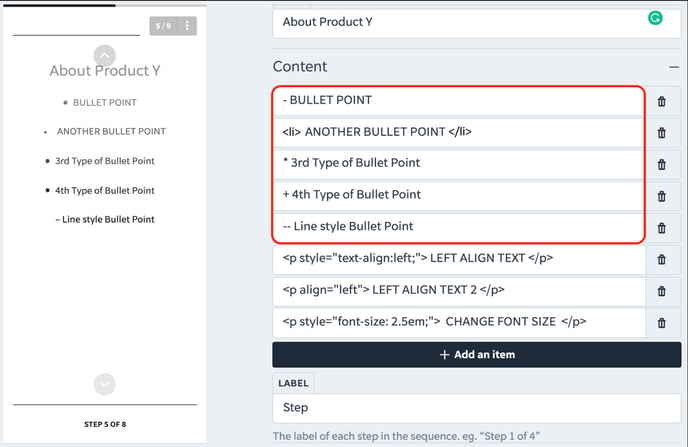
Create dot style bullet points by using:
\*
\+
\
\-
To create line style bullet points, use two dashes with no spaces (--).
#### 
#### Text Alignment
To left-align text:
```
ENTER TEXT HERE
```
To centre-align text:
```
ENTER TEXT HERE
```
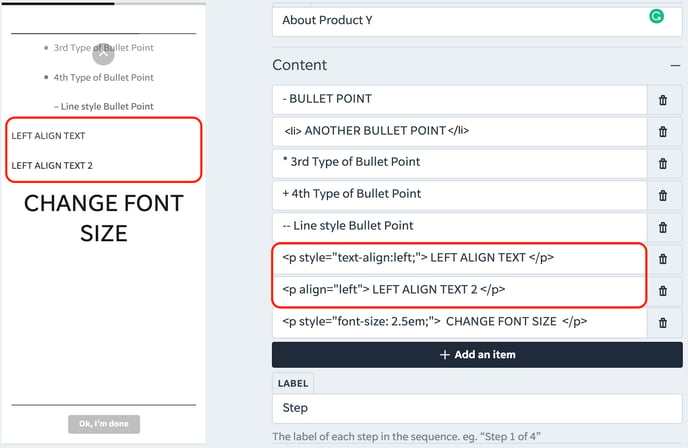Some templates will automatically left align. Most templates centre align automatically.
You can’t combine alignment with font size markup.
#### Superscripts
Wrap the text you want to superscript like so:
```
Normal Text 2TM
```
**Content**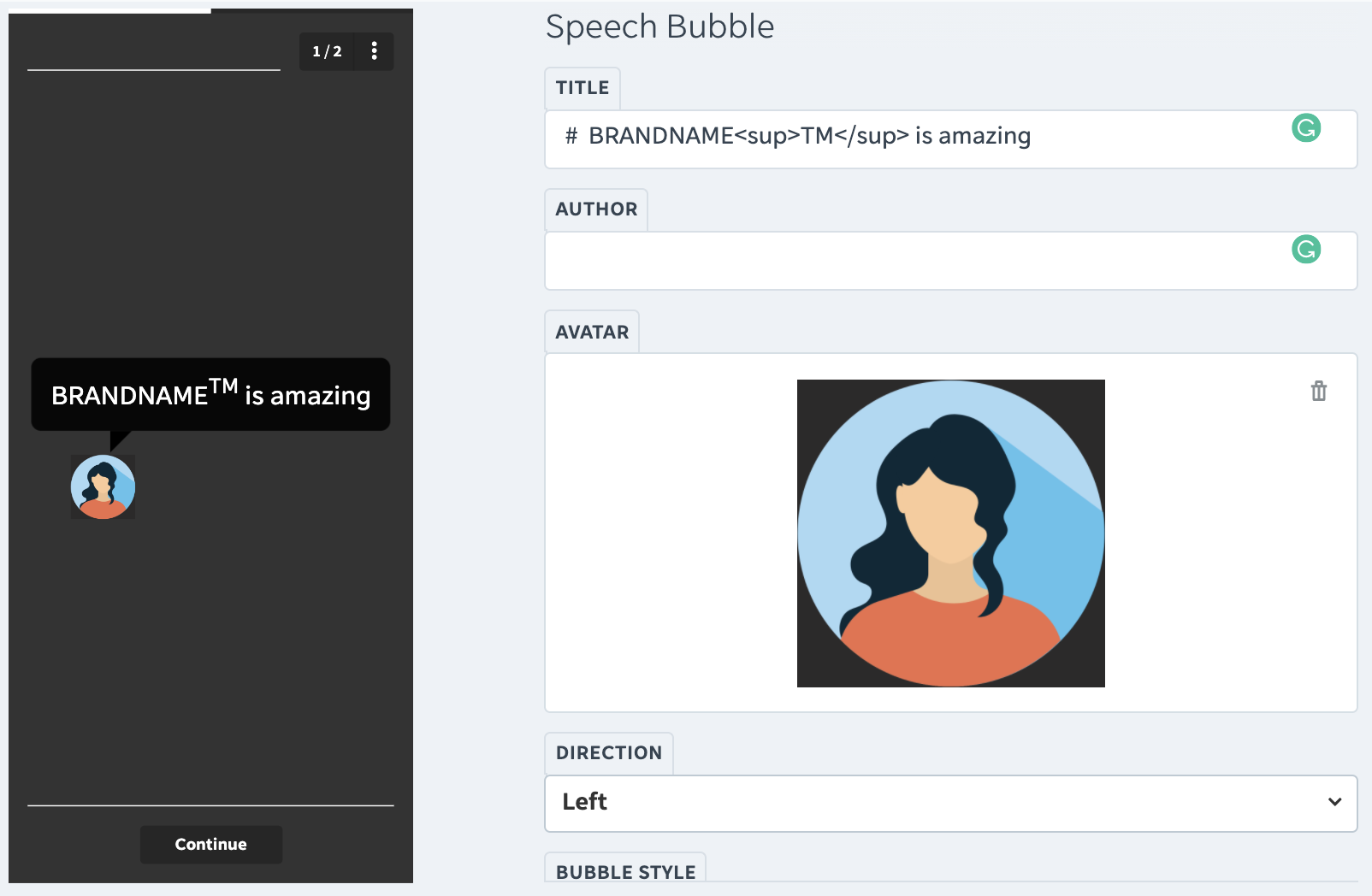
#### Line Breaks
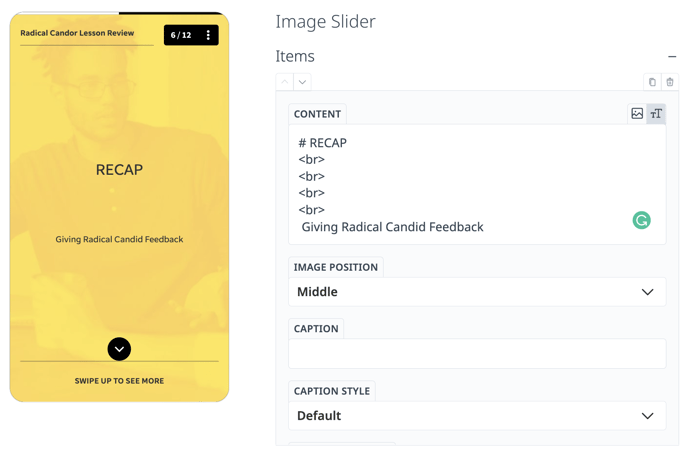
Depending on the slide/template you're using, sometimes hitting 'return' on your keyboard isn't available, so you can get around this by adding: **\**
#### Image Insert
Insert images to non-image template slides by adding this to the text box:
!\[alt-text\](image-link.jpg)
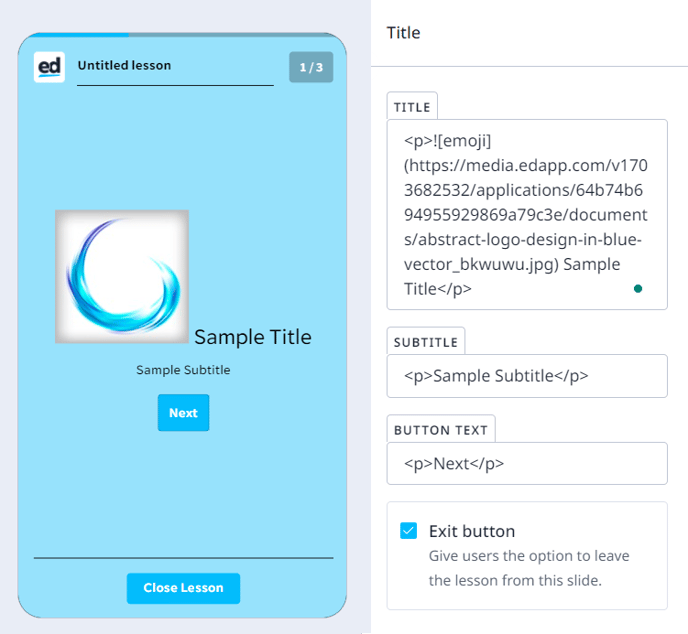
Please note that enabling the Code View is necessary to utilize 'Markdowns'. This is due to the fact that in the RTE (Rich Text Editor) view, any markdown is immediately applied and rendered in the input field. However, in the code view, markdowns are still applied and displayed in the input field. You can find further information about our Rich Text Editor [HERE](https://support.edapp.com/authoring-basics-toolkit?hsLang=en#Formatting-and-styling-text).
#### Code View
The EdApp Creator tool gives users the flexibility to switch between RTE view and code view for the course they are editing.
If you are an advanced user and wish to use HTML to format and style your text, you can turn on the ‘Code View’ mode by navigating to the three-dot menu in the upper right corner and selecting ‘\ Enable code view.’
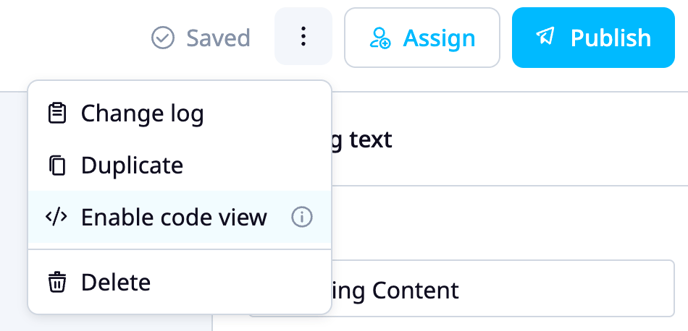
By switching to code view, advanced users have the option to format and style their text using HTML directly. This allows users to leverage their expertise and have fine-grained control over the presentation of their content.
*Once 'Code View' is activated for a particular course, it persists indefinitely on that user's device for that specific course until manually disabled, reverting back to the rich text editor (RTE) view*
- [Getting started](https://support.edapp.com/getting-started?hsLang=en#main-content)
- [Get Started in 5 Minutes](https://support.edapp.com/getting-started?hsLang=en#get-started-in-5-minutes)
- [Lessons & Courses](https://support.edapp.com/getting-started?hsLang=en#lessons-courses)
- [Basic User Management](https://support.edapp.com/getting-started?hsLang=en#basic-user-management)
- [Course Library](https://support.edapp.com/getting-started?hsLang=en#course-library)
- [Definitions](https://support.edapp.com/getting-started?hsLang=en#definitions)
- [Admin portal](https://support.edapp.com/admin-portal?hsLang=en#main-content)
- [Advanced User Management](https://support.edapp.com/admin-portal?hsLang=en#advanced-user-management)
- [Lesson Management](https://support.edapp.com/admin-portal?hsLang=en#lesson-management)
- [Course Management](https://support.edapp.com/admin-portal?hsLang=en#course-management)
- [App Customisation](https://support.edapp.com/admin-portal?hsLang=en#app-customisation)
- [Peer Learning](https://support.edapp.com/admin-portal?hsLang=en#peer-learning)
- [Engagement](https://support.edapp.com/admin-portal?hsLang=en#engagement)
- [Analytics](https://support.edapp.com/admin-portal?hsLang=en#analytics)
- [Features](https://support.edapp.com/admin-portal?hsLang=en#features)
- [EducateAll](https://support.edapp.com/admin-portal?hsLang=en#educateall)
- [Sharing Content](https://support.edapp.com/admin-portal?hsLang=en#sharing-content)
- [Integrations](https://support.edapp.com/admin-portal?hsLang=en#integrations)
- [Learner's app](https://support.edapp.com/learners-app?hsLang=en#main-content)
- [Logging In](https://support.edapp.com/learners-app?hsLang=en#logging-in)
- [Taking Courses](https://support.edapp.com/learners-app?hsLang=en#taking-courses)
- [Features For Learners](https://support.edapp.com/learners-app?hsLang=en#features-for-learners)
- [Extras](https://support.edapp.com/learners-app?hsLang=en#extras)
- [Star Bar](https://support.edapp.com/learners-app?hsLang=en#star-bar)
- [Creator Tool](https://support.edapp.com/creator-tool?hsLang=en#main-content)
- [Branding](https://support.edapp.com/creator-tool?hsLang=en#branding)
- [Templates](https://support.edapp.com/creator-tool?hsLang=en#templates)
- [Course & Lesson Configurations](https://support.edapp.com/creator-tool?hsLang=en#course-lesson-configurations)
- [Copying Slides/Lessons/Courses](https://support.edapp.com/creator-tool?hsLang=en#copying-slides-lessons-courses)
- [Translations](https://support.edapp.com/creator-tool?hsLang=en#translations)
- [Content](https://support.edapp.com/creator-tool?hsLang=en#content)
- [Tips and tricks](https://support.edapp.com/tips-and-tricks?hsLang=en#main-content)
- [Learning Programme Management](https://support.edapp.com/tips-and-tricks?hsLang=en#learning-programme-management)
- [Authoring](https://support.edapp.com/tips-and-tricks?hsLang=en#authoring)
- [Best Practices](https://support.edapp.com/tips-and-tricks?hsLang=en#best-practices)
- [Programme Success](https://support.edapp.com/tips-and-tricks?hsLang=en#programme-success)
- [Engagement](https://support.edapp.com/tips-and-tricks?hsLang=en#engagement)
- [Launch Kit](https://support.edapp.com/tips-and-tricks?hsLang=en#launch-kit)
- [FAQ](https://support.edapp.com/faq?hsLang=en#main-content)
- [Lessons & Courseware](https://support.edapp.com/faq?hsLang=en#lessons-courseware)
- [Authoring](https://support.edapp.com/faq?hsLang=en#authoring)
- [User Registration & Management](https://support.edapp.com/faq?hsLang=en#user-registration-management)
- [Display](https://support.edapp.com/faq?hsLang=en#display)
- [Engagement](https://support.edapp.com/faq?hsLang=en#engagement)
- [Peer Learning](https://support.edapp.com/faq?hsLang=en#peer-learning)
- [Knowledge Performance](https://support.edapp.com/faq?hsLang=en#knowledge-performance)
- [Analytics](https://support.edapp.com/faq?hsLang=en#analytics)
- [System & Technical Support](https://support.edapp.com/faq?hsLang=en#system-technical-support)
- [Subscriptions & Pricing](https://support.edapp.com/faq?hsLang=en#subscriptions-pricing)
- [Educate All](https://support.edapp.com/faq?hsLang=en#educate-all)
- [Contact & Support](https://support.edapp.com/faq?hsLang=en#contact-support)
- [Webinars](https://support.edapp.com/webinars?hsLang=en)
- [Technical / API documentation](https://support.edapp.com/technical-api-documentation?hsLang=en#main-content)
- [Single Sign On for the Learner's Portal](https://support.edapp.com/technical-api-documentation?hsLang=en#single-sign-on-for-the-learners-portal)
- [Single Sign-on for Admin Portal](https://support.edapp.com/technical-api-documentation?hsLang=en#single-sign-on-for-admin-portal)
- [Integrations](https://support.edapp.com/technical-api-documentation?hsLang=en#integrations)
- [API](https://support.edapp.com/technical-api-documentation?hsLang=en#api)
- [Legal documentation](https://support.edapp.com/legal-documentation?hsLang=en#main-content)
- [Third Party Gateway](https://support.edapp.com/legal-documentation?hsLang=en#third-party-gateway)
- [Privacy & Terms](https://support.edapp.com/legal-documentation?hsLang=en#privacy-terms)
- [Troubleshooting](https://support.edapp.com/troubleshooting?hsLang=en)
- [EdApp to SC Migration](https://support.edapp.com/edapp-to-sc-migration?hsLang=en)
- [Default HubSpot Blog](https://edapp-5741180.hs-sites.com/blog)
[](http://edapp.com)
EdApp Help Center
Copyright © 2026, EdApp Pty Ltd