---
title: Move, duplicate and copy lesson slides
description: Sometimes your courses may feature similar content or lesson structures. To save you from setting up slides from scratch, you can import established templates from another course or lesson and even duplicate slides within a lesson.
---
[Skip to content](https://support.edapp.com/move-duplicate-copy-lesson-slides#main-content)
English
Show submenu for translations
![EdApp - logo dark mode-1.png\]](https://support.edapp.com/hs-fs/hubfs/EdApp%20-%20logo%20dark%20mode-1.png?height=40&name=EdApp%20-%20logo%20dark%20mode-1.png)
- [Default HubSpot Blog](https://edapp-5741180.hs-sites.com/blog)
Open main navigation
Close main navigation
- [Default HubSpot Blog](https://edapp-5741180.hs-sites.com/blog)
- English
Show submenu for translations
- [edapp.com](https://www.edapp.com/)
[edapp.com](https://www.edapp.com/)
Hello. How can we help you?
- There are no suggestions because the search field is empty.
1. [Help Center](https://support.edapp.com/?hsLang=en)
2. [Creator Tool](https://support.edapp.com/creator-tool?hsLang=en)
3. [Copying Slides/Lessons/Courses](https://support.edapp.com/creator-tool?hsLang=en#copying-slides-lessons-courses)
# Move, duplicate and copy lesson slides
## Sometimes your courses may feature similar content or lesson structures. To save you from setting up slides from scratch, you can import established templates from another course or lesson and even duplicate slides within a lesson.
#### Content
[Duplicate a slide](https://support.edapp.com/move-duplicate-copy-lesson-slides#duplicate)
[Import slides from other lessons](https://support.edapp.com/move-duplicate-copy-lesson-slides#import-slides)
[Move slide order in a course](https://support.edapp.com/move-duplicate-copy-lesson-slides#slide-move)
### Duplicate a lesson slide
1. Hover over the lesson slide.
2. Click on the 3 dots beside the lesson slide title.
3. Click "Duplicate".

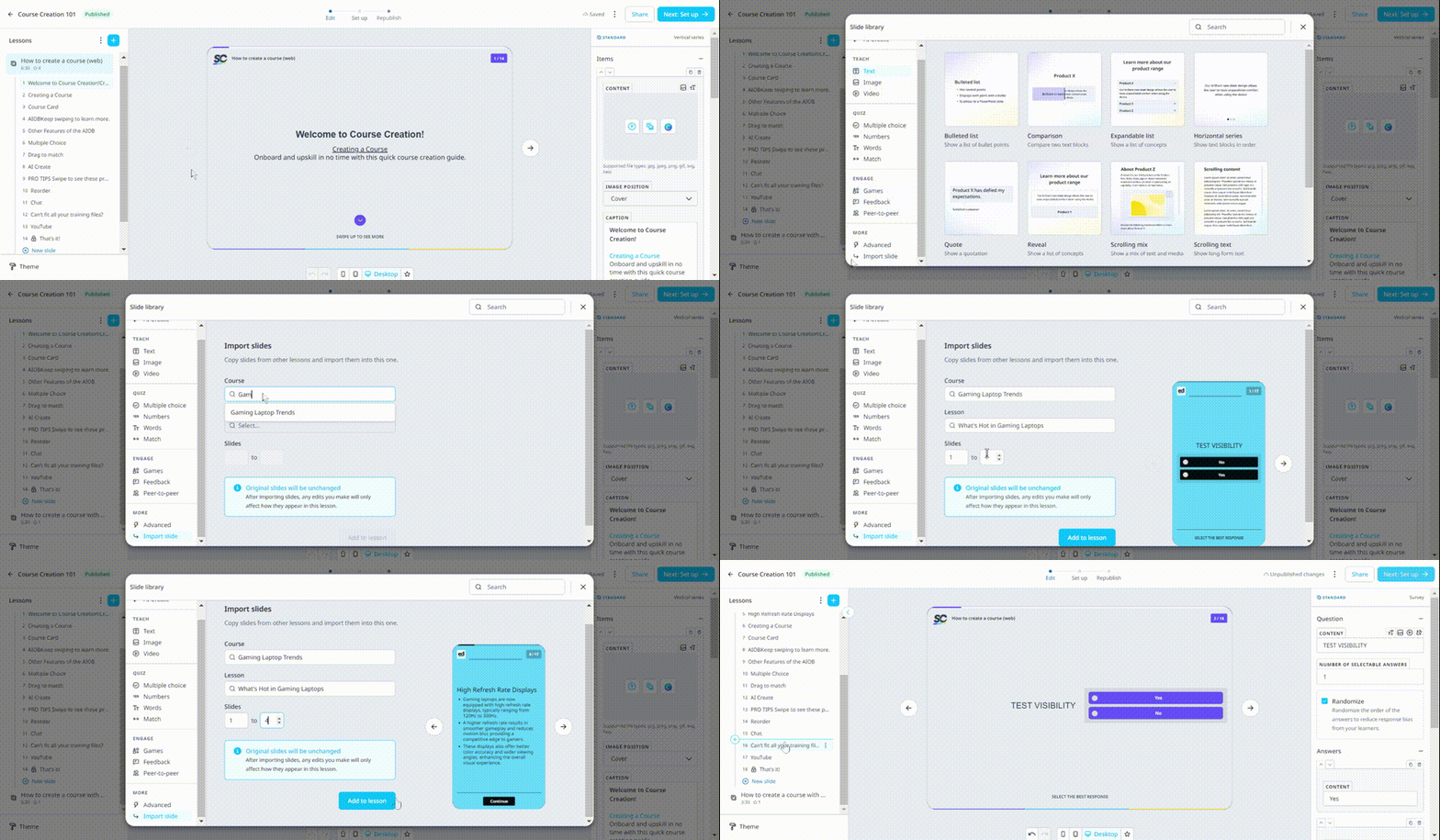
### Import a slide from another lesson
1. Click  'New slide on the lower part of your selected lesson. You'll be able to search for the relevant course, and lesson and choose the slides you would like to import.

2. Click "Add to Lesson" and these slides will appear in the lesson.
### Move slides within a course
Users can now easily drag and drop slides within a lesson or from one lesson to another enabling quick content reorganization. You only need to click and hold the lesson before dragging it to your preferred order.
*Drag and Drop slides within a lesson:*

*Drag and Drop slides across lessons:*
- [Getting started](https://support.edapp.com/getting-started?hsLang=en#main-content)
- [Get Started in 5 Minutes](https://support.edapp.com/getting-started?hsLang=en#get-started-in-5-minutes)
- [Lessons & Courses](https://support.edapp.com/getting-started?hsLang=en#lessons-courses)
- [Basic User Management](https://support.edapp.com/getting-started?hsLang=en#basic-user-management)
- [Course Library](https://support.edapp.com/getting-started?hsLang=en#course-library)
- [Definitions](https://support.edapp.com/getting-started?hsLang=en#definitions)
- [Admin portal](https://support.edapp.com/admin-portal?hsLang=en#main-content)
- [Advanced User Management](https://support.edapp.com/admin-portal?hsLang=en#advanced-user-management)
- [Lesson Management](https://support.edapp.com/admin-portal?hsLang=en#lesson-management)
- [Course Management](https://support.edapp.com/admin-portal?hsLang=en#course-management)
- [App Customisation](https://support.edapp.com/admin-portal?hsLang=en#app-customisation)
- [Peer Learning](https://support.edapp.com/admin-portal?hsLang=en#peer-learning)
- [Engagement](https://support.edapp.com/admin-portal?hsLang=en#engagement)
- [Analytics](https://support.edapp.com/admin-portal?hsLang=en#analytics)
- [Features](https://support.edapp.com/admin-portal?hsLang=en#features)
- [EducateAll](https://support.edapp.com/admin-portal?hsLang=en#educateall)
- [Sharing Content](https://support.edapp.com/admin-portal?hsLang=en#sharing-content)
- [Integrations](https://support.edapp.com/admin-portal?hsLang=en#integrations)
- [Learner's app](https://support.edapp.com/learners-app?hsLang=en#main-content)
- [Logging In](https://support.edapp.com/learners-app?hsLang=en#logging-in)
- [Taking Courses](https://support.edapp.com/learners-app?hsLang=en#taking-courses)
- [Features For Learners](https://support.edapp.com/learners-app?hsLang=en#features-for-learners)
- [Extras](https://support.edapp.com/learners-app?hsLang=en#extras)
- [Star Bar](https://support.edapp.com/learners-app?hsLang=en#star-bar)
- [Creator Tool](https://support.edapp.com/creator-tool?hsLang=en#main-content)
- [Branding](https://support.edapp.com/creator-tool?hsLang=en#branding)
- [Templates](https://support.edapp.com/creator-tool?hsLang=en#templates)
- [Course & Lesson Configurations](https://support.edapp.com/creator-tool?hsLang=en#course-lesson-configurations)
- [Copying Slides/Lessons/Courses](https://support.edapp.com/creator-tool?hsLang=en#copying-slides-lessons-courses)
- [Translations](https://support.edapp.com/creator-tool?hsLang=en#translations)
- [Content](https://support.edapp.com/creator-tool?hsLang=en#content)
- [Tips and tricks](https://support.edapp.com/tips-and-tricks?hsLang=en#main-content)
- [Learning Programme Management](https://support.edapp.com/tips-and-tricks?hsLang=en#learning-programme-management)
- [Authoring](https://support.edapp.com/tips-and-tricks?hsLang=en#authoring)
- [Best Practices](https://support.edapp.com/tips-and-tricks?hsLang=en#best-practices)
- [Programme Success](https://support.edapp.com/tips-and-tricks?hsLang=en#programme-success)
- [Engagement](https://support.edapp.com/tips-and-tricks?hsLang=en#engagement)
- [Launch Kit](https://support.edapp.com/tips-and-tricks?hsLang=en#launch-kit)
- [FAQ](https://support.edapp.com/faq?hsLang=en#main-content)
- [Lessons & Courseware](https://support.edapp.com/faq?hsLang=en#lessons-courseware)
- [Authoring](https://support.edapp.com/faq?hsLang=en#authoring)
- [User Registration & Management](https://support.edapp.com/faq?hsLang=en#user-registration-management)
- [Display](https://support.edapp.com/faq?hsLang=en#display)
- [Engagement](https://support.edapp.com/faq?hsLang=en#engagement)
- [Peer Learning](https://support.edapp.com/faq?hsLang=en#peer-learning)
- [Knowledge Performance](https://support.edapp.com/faq?hsLang=en#knowledge-performance)
- [Analytics](https://support.edapp.com/faq?hsLang=en#analytics)
- [System & Technical Support](https://support.edapp.com/faq?hsLang=en#system-technical-support)
- [Subscriptions & Pricing](https://support.edapp.com/faq?hsLang=en#subscriptions-pricing)
- [Educate All](https://support.edapp.com/faq?hsLang=en#educate-all)
- [Contact & Support](https://support.edapp.com/faq?hsLang=en#contact-support)
- [Webinars](https://support.edapp.com/webinars?hsLang=en)
- [Technical / API documentation](https://support.edapp.com/technical-api-documentation?hsLang=en#main-content)
- [Single Sign On for the Learner's Portal](https://support.edapp.com/technical-api-documentation?hsLang=en#single-sign-on-for-the-learners-portal)
- [Single Sign-on for Admin Portal](https://support.edapp.com/technical-api-documentation?hsLang=en#single-sign-on-for-admin-portal)
- [Integrations](https://support.edapp.com/technical-api-documentation?hsLang=en#integrations)
- [API](https://support.edapp.com/technical-api-documentation?hsLang=en#api)
- [Legal documentation](https://support.edapp.com/legal-documentation?hsLang=en#main-content)
- [Third Party Gateway](https://support.edapp.com/legal-documentation?hsLang=en#third-party-gateway)
- [Privacy & Terms](https://support.edapp.com/legal-documentation?hsLang=en#privacy-terms)
- [Troubleshooting](https://support.edapp.com/troubleshooting?hsLang=en)
- [EdApp to SC Migration](https://support.edapp.com/edapp-to-sc-migration?hsLang=en)
- [Default HubSpot Blog](https://edapp-5741180.hs-sites.com/blog)
[](http://edapp.com)
EdApp Help Center
Copyright © 2026, EdApp Pty Ltd
```json
{
"@context" : "https://schema.org",
"@type" : "VideoObject",
"contentUrl" : "https://stream.mux.com/GkEX2Zp36kf2X8r2ZHUjDTwvPMXRO00f339C01IAEKNYM/capped-1080p.mp4",
"dateModified" : "2025-01-23T01:43:54.999Z",
"duration" : "PT0S",
"height" : 1192,
"name" : "screen-capture - 2025-01-23T094253.531",
"thumbnailUrl" : "https://5741180.fs1.hubspotusercontent-na1.net/hubfs/5741180/screen-capture%20-%202025-01-23T094253.531.webm/medium.jpg",
"uploadDate" : "2025-01-23T01:43:54.995Z",
"width" : 2862
}
```