---
title: Narration
description: The Narration feature enables you to add audio to your lessons using AI-powered text-to-speech Narration or by uploading pre-recorded content.
---
[Skip to content](https://support.edapp.com/narration#main-content)
English
Show submenu for translations
![EdApp - logo dark mode-1.png\]](https://support.edapp.com/hs-fs/hubfs/EdApp%20-%20logo%20dark%20mode-1.png?height=40&name=EdApp%20-%20logo%20dark%20mode-1.png)
- [Default HubSpot Blog](https://edapp-5741180.hs-sites.com/blog)
Open main navigation
Close main navigation
- [Default HubSpot Blog](https://edapp-5741180.hs-sites.com/blog)
- English
Show submenu for translations
- [edapp.com](https://www.edapp.com/)
[edapp.com](https://www.edapp.com/)
Hello. How can we help you?
- There are no suggestions because the search field is empty.
1. [Help Center](https://support.edapp.com/?hsLang=en)
2. [Creator Tool](https://support.edapp.com/creator-tool?hsLang=en)
3. [Templates](https://support.edapp.com/creator-tool?hsLang=en#templates)
# Narration
## The Narration feature enables you to add audio to your lessons using AI-powered text-to-speech Narration or by uploading pre-recorded content.
### Contents
- [Enhance Engagement with Narration](https://support.edapp.com/narration#use-case)
- [Add Narration to a Lesson with AI](https://support.edapp.com/narration#configuration)
- [Add Manual Narration to a Lesson](https://support.edapp.com/narration#configuration2)
- [Edit Lesson Narration](https://support.edapp.com/narration#configuration2)
- [Other templates that support MP3](https://support.edapp.com/narration#other-templates)
- [Supported languages](https://support.edapp.com/narration#supported-languages)
#### Enhance Engagement with Narration
Adding narration to your lessons supports users with an auditory learning style, helping them maintain focus and retain information more effectively. It also enriches the overall training experience by catering to diverse learning preferences, making your content more accessible and engaging for all users.
You can add narration to your lessons in SafetyCulture Training using one of two methods:
- **AI Narration** (DIY, Managed, and Enterprise Plans): Automatically convert lesson text into audio using text-to-speech technology. Choose from a variety of voices and accents (depending on the course language) to create consistent, engaging narration—no manual recording required.
- **Manual Narration** (All Plans including Free Plan): Upload your MP3 files to use as lesson narration. This option lets you add a personal touch with custom audio tailored to your team’s specific needs.
The maximum file size for MP3 is 40 MB.
#### Add Narration to a Lesson with AI
You can easily add AI-generated narration to your content lessons in SafetyCulture Training by following these steps:
1. In the right-hand panel of the lesson editor, scroll to the **Narration** section and click **Narrate with AI**
2. If available, select your **preferred voice and accent** from the dropdown menu.
3. Click **Apply** in the lower-right corner of the page.
4. Once narration is added, configure the slide's playback settings:
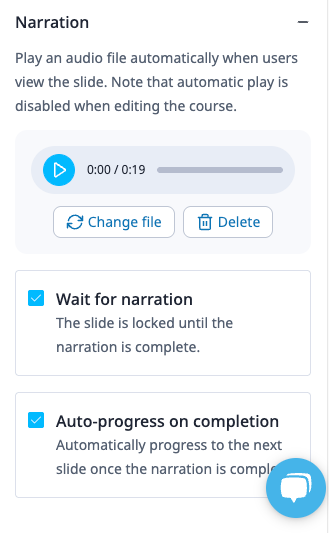
- **Wait for narration**: Lock the slide until the narration finishes.
- **Auto-progress on completion**: Automatically move to the next slide after narration ends.
5. To apply narration to all supported slides in the course, click **Bulk narrate with AI**
- In the pop-up window, use the checkbox to **enable or disable narration overwrite**, then click **Apply**.
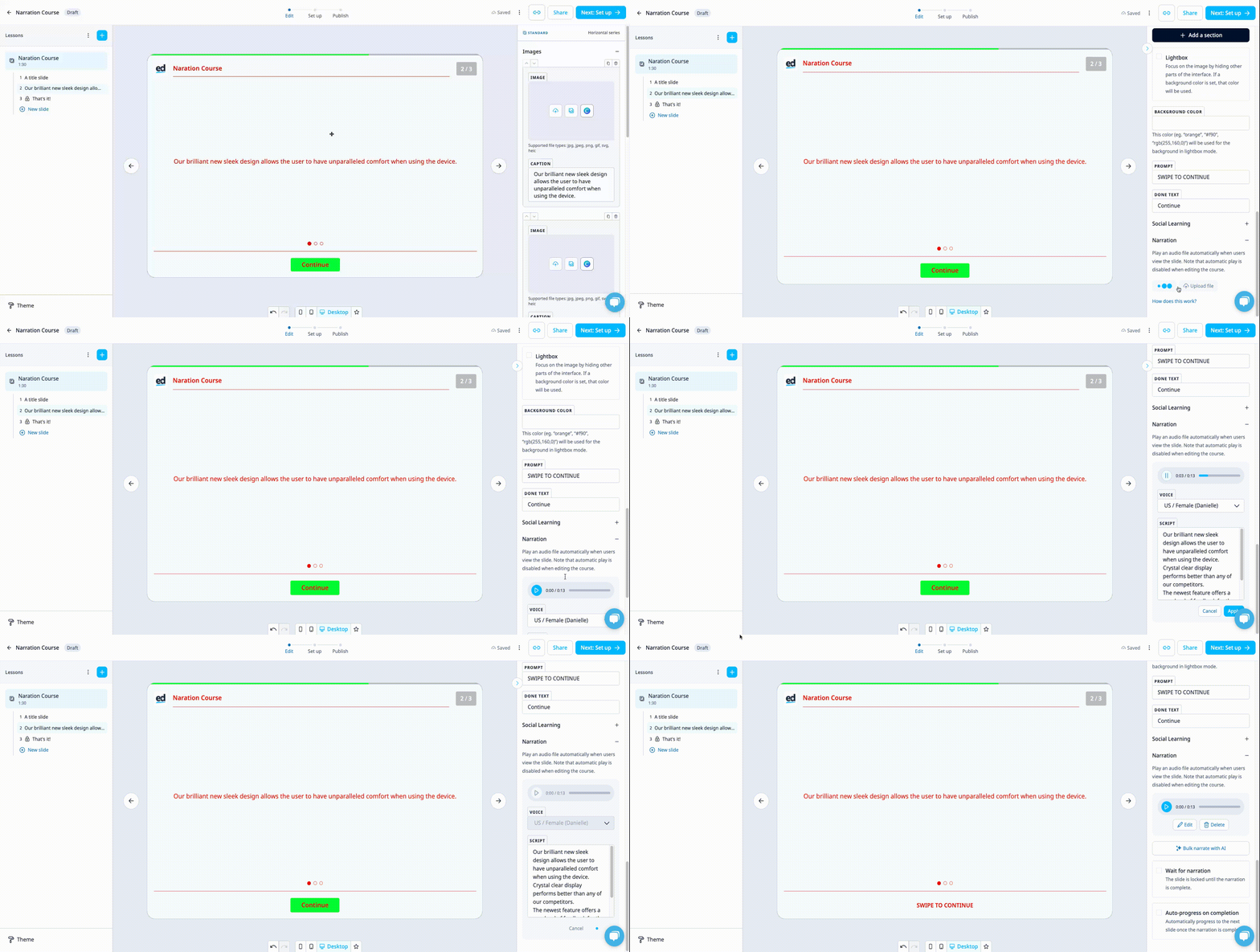
If **narration overwrite** is enabled, any existing narration will be replaced. Your selected voice and accent (if available) will also apply to all supported slides.
#### Add Manual Narration to a Lesson
You can upload your own MP3 narration files to personalize your lessons. Here’s how:
1. In the right-hand panel of the lesson editor, scroll to the **Narration** section and click **Upload file** to add an MP3 file from your device.
2. After uploading the file, configure the slide’s playback settings:
- **Wait for narration**: Lock the slide until the narration finishes.
- **Auto-progress on completion**: Automatically move to the next slide when the narration ends.
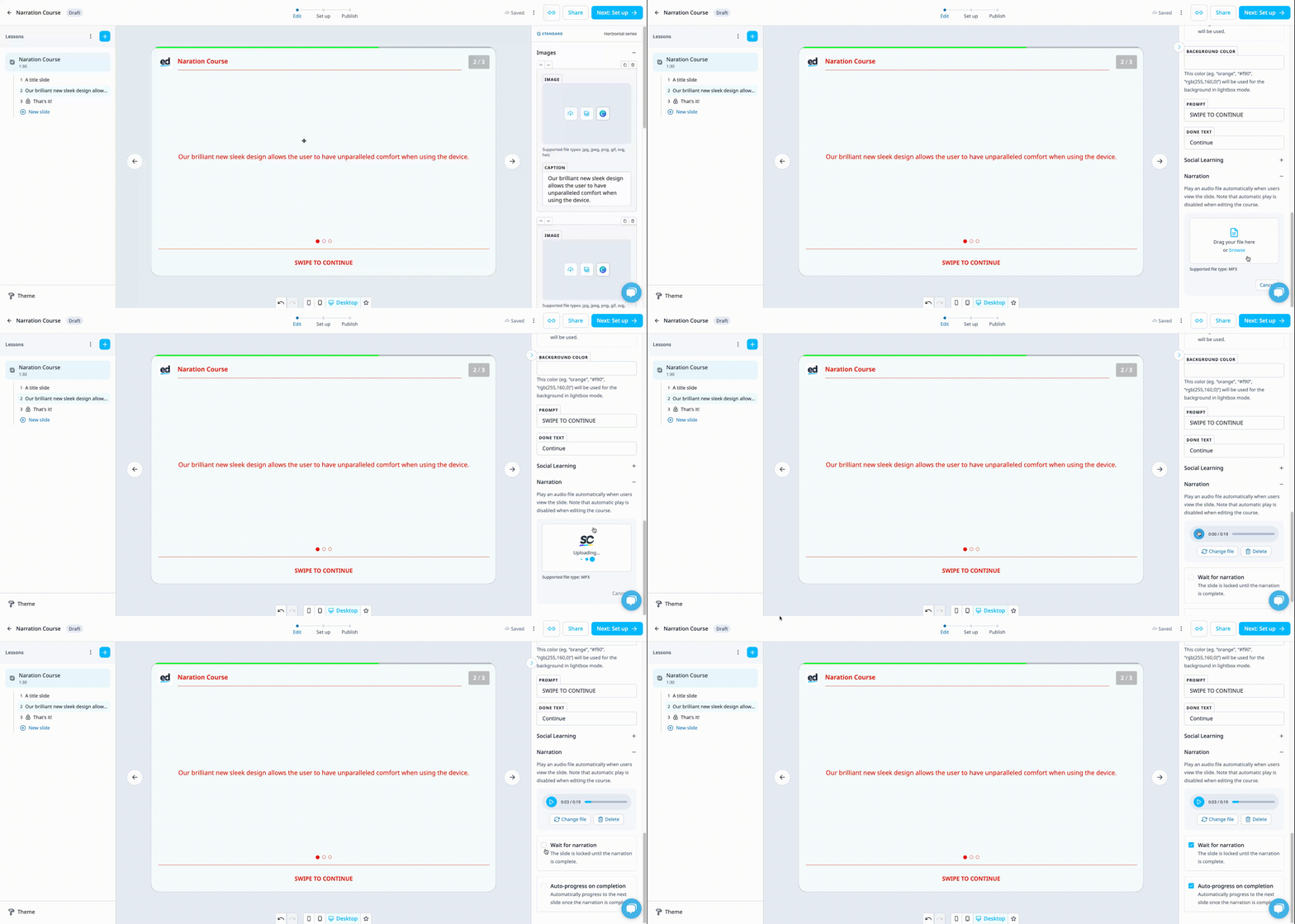
If **narration overwrite** is enabled, any existing narration will be replaced. Your selected voice and accent (if available) will also apply to all supported slides.
It’s important to wait for the upload to finish before moving on to edit any other slides. The upload time may vary depending on the length of the recording.
The narration you have uploaded won't play in the creator tool, so as not to disrupt your authoring experience. To test the MP3 file you have uploaded for your narration, you can either:
- Log in as a learner on the [Learner Portal](https://web.edapp.com/login) (https://web.edapp.com/login) or the app.
- [Create a Public Link](https://support.edapp.com/share-lessons-for-review?hsLang=en) for the course.
- Start a [Group Training](https://support.edapp.com/group-training?hsLang=en) session.
- Use the [Review Tool](https://support.edapp.com/course-review?hsLang=en).
See the "[Reviewing Courses](https://support.edapp.com/reviewing-courses?hsLang=en)" article here for more on how to review your courses before they are live to learners.
#### Edit Lesson Narration
You can update both AI-generated and manually uploaded narration in your lessons:
1. **For AI narration**:
- Click **Edit** in the **Narration** section.
- Edit the script as needed and select a different voice or accent (depending on the course language).
- Click **Apply** in the lower-right corner of the page to save changes.
2. **For manual narration**:
Click **Change file** to upload a new MP3 file from your device.
3. After updating the narration, you can adjust the slide settings:
- **Wait for narration**: Lock the slide until narration is complete.
- **Auto-progress on completion**: Automatically advance to the next slide when narration ends.
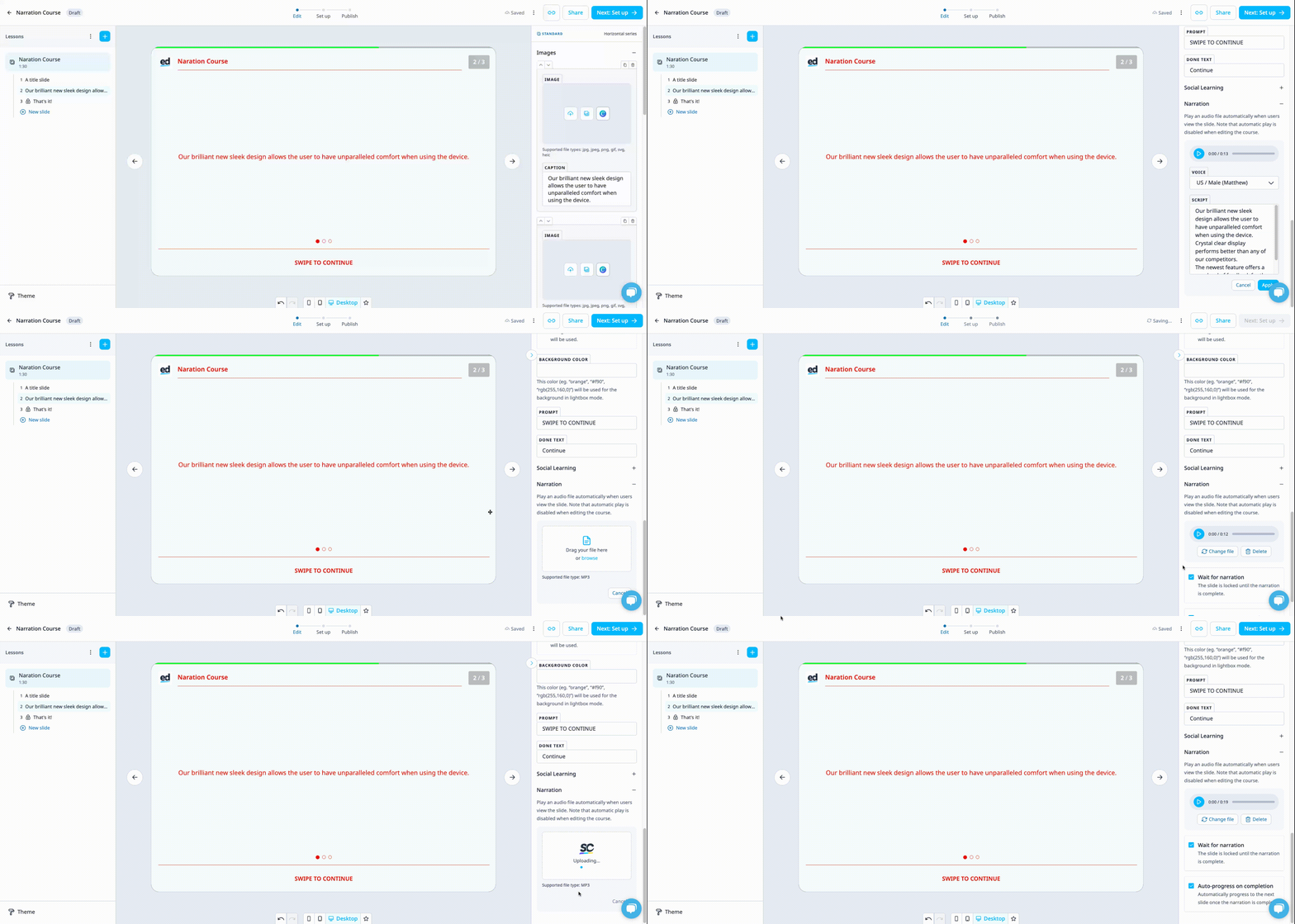
There’s no character or word limit for AI-generated narration, but it's best to avoid large blocks of text. Breaking content into smaller sections helps produce clearer, more engaging narration.
**Tip:** You can combine both AI and manual narration in the same course. Just be aware that using **Bulk narrate with AI** will replace any existing manual narration.
**Reminder:** Narration must be added separately to each translated version of a course. AI narration is only available in supported languages.
#### Other templates that support MP3
The two templates below also support MP3 and can be played on demand.
- Media Collection
- Scrolling Media
Both templates will have sections with a sound tab, which you can select to upload an MP3.
If you can't hear any narration, check if your device has any of these settings active or if the uploaded file is corrupted.
1\. The phone mode might be set to Silent, Mute, or Do Not Disturb mode.
2\. For IOS users, the mute/ringer slider on the side of the phone might be set to mute/off.
3\. The uploaded sound file may not be supported, may be corrupted, or may have no sound recorded in the file.
#### **Narration in all Lesson Slide templates**
| **Slide template** | **Supports Narration** |
| --- | --- |
| Title | ✔ |
| Bulleted List | ✔ |
| Comparison | ✔ |
| Expandable List | ✔ |
| Horizontal series | ✔ |
| Reveal | ✔ |
| Scrolling mix | ✔ |
| Scrolling text | ✔ |
| Sequence | ✔ |
| Table | ✔ |
| Vertical series | ✔ |
| Image collection *\[can have a slide template narration as well as narrations per image\]* | ✔ |
| Image stack | ✔ |
| Image waypoints *\[can have a slide template narration as well as narrations per image\]* | ✔ |
| Scratch to reveal | ✔ |
| Single image | ✔ |
| Categorize \[multi-input\] | ❓ |
| Image map *\[can have a slide template narration as well as narrations per image\]* | ✔ |
| Quote | ✘ |
| Exit Lesson | ✘ |
| Media Collection | ✘ |
| Carousel | ✘ |
| Chat | ✘ |
| Circle the answer | ✘ |
| Multi-question | ✘ |
| Multiple Choice | ✘ |
| Select Image | ✘ |
| Dial | ✘ |
| Dial (Distribution) | ✘ |
| Number picker | ✘ |
| Number sentence | ✘ |
| Pie chart | ✘ |
| Ratio | ✘ |
| Slider | ✘ |
| Missing letters | ✘ |
| Missing words | ✘ |
| Sentence builder | ✘ |
| Strike-out | ✘ |
| Connect | ✘ |
| Drag to match | ✘ |
| Image pairs | ✘ |
| Reorder | ✘ |
| Select in order | ✘ |
| Elevator | ✘ |
| Find-a-word | ✘ |
| Image/word match | ✘ |
| Jeopardy | ✘ |
| Left or right | ✘ |
| Letter jumble | ✘ |
| Memory | ✘ |
| Next in order | ✘ |
| Free text | ✘ |
| Quadrant | ✘ |
| Slider | ✘ |
| Survey | ✘ |
| AICC | ✘ |
| External URL | ✘ |
| SCORM | ✘ |
#### Supported languages
| Arabic |
| --- |
| Belgian Dutch |
| Catalan |
| Czech |
| Chinese (Cantonese) |
| Chinese (Mandarin) |
| Danish |
| Dutch |
| English |
| Finnish |
| French |
| German |
| Hindi |
| Italian |
| Japanese |
| Korean |
| Norwegian |
| Polish |
| Portuguese |
| Spanish |
| Swedish |
| Turkish |
- [Getting started](https://support.edapp.com/getting-started?hsLang=en#main-content)
- [Get Started in 5 Minutes](https://support.edapp.com/getting-started?hsLang=en#get-started-in-5-minutes)
- [Lessons & Courses](https://support.edapp.com/getting-started?hsLang=en#lessons-courses)
- [Basic User Management](https://support.edapp.com/getting-started?hsLang=en#basic-user-management)
- [Course Library](https://support.edapp.com/getting-started?hsLang=en#course-library)
- [Definitions](https://support.edapp.com/getting-started?hsLang=en#definitions)
- [Admin portal](https://support.edapp.com/admin-portal?hsLang=en#main-content)
- [Advanced User Management](https://support.edapp.com/admin-portal?hsLang=en#advanced-user-management)
- [Lesson Management](https://support.edapp.com/admin-portal?hsLang=en#lesson-management)
- [Course Management](https://support.edapp.com/admin-portal?hsLang=en#course-management)
- [App Customisation](https://support.edapp.com/admin-portal?hsLang=en#app-customisation)
- [Peer Learning](https://support.edapp.com/admin-portal?hsLang=en#peer-learning)
- [Engagement](https://support.edapp.com/admin-portal?hsLang=en#engagement)
- [Analytics](https://support.edapp.com/admin-portal?hsLang=en#analytics)
- [Features](https://support.edapp.com/admin-portal?hsLang=en#features)
- [EducateAll](https://support.edapp.com/admin-portal?hsLang=en#educateall)
- [Sharing Content](https://support.edapp.com/admin-portal?hsLang=en#sharing-content)
- [Integrations](https://support.edapp.com/admin-portal?hsLang=en#integrations)
- [Learner's app](https://support.edapp.com/learners-app?hsLang=en#main-content)
- [Logging In](https://support.edapp.com/learners-app?hsLang=en#logging-in)
- [Taking Courses](https://support.edapp.com/learners-app?hsLang=en#taking-courses)
- [Features For Learners](https://support.edapp.com/learners-app?hsLang=en#features-for-learners)
- [Extras](https://support.edapp.com/learners-app?hsLang=en#extras)
- [Star Bar](https://support.edapp.com/learners-app?hsLang=en#star-bar)
- [Creator Tool](https://support.edapp.com/creator-tool?hsLang=en#main-content)
- [Branding](https://support.edapp.com/creator-tool?hsLang=en#branding)
- [Templates](https://support.edapp.com/creator-tool?hsLang=en#templates)
- [Course & Lesson Configurations](https://support.edapp.com/creator-tool?hsLang=en#course-lesson-configurations)
- [Copying Slides/Lessons/Courses](https://support.edapp.com/creator-tool?hsLang=en#copying-slides-lessons-courses)
- [Translations](https://support.edapp.com/creator-tool?hsLang=en#translations)
- [Content](https://support.edapp.com/creator-tool?hsLang=en#content)
- [Tips and tricks](https://support.edapp.com/tips-and-tricks?hsLang=en#main-content)
- [Learning Programme Management](https://support.edapp.com/tips-and-tricks?hsLang=en#learning-programme-management)
- [Authoring](https://support.edapp.com/tips-and-tricks?hsLang=en#authoring)
- [Best Practices](https://support.edapp.com/tips-and-tricks?hsLang=en#best-practices)
- [Programme Success](https://support.edapp.com/tips-and-tricks?hsLang=en#programme-success)
- [Engagement](https://support.edapp.com/tips-and-tricks?hsLang=en#engagement)
- [Launch Kit](https://support.edapp.com/tips-and-tricks?hsLang=en#launch-kit)
- [FAQ](https://support.edapp.com/faq?hsLang=en#main-content)
- [Lessons & Courseware](https://support.edapp.com/faq?hsLang=en#lessons-courseware)
- [Authoring](https://support.edapp.com/faq?hsLang=en#authoring)
- [User Registration & Management](https://support.edapp.com/faq?hsLang=en#user-registration-management)
- [Display](https://support.edapp.com/faq?hsLang=en#display)
- [Engagement](https://support.edapp.com/faq?hsLang=en#engagement)
- [Peer Learning](https://support.edapp.com/faq?hsLang=en#peer-learning)
- [Knowledge Performance](https://support.edapp.com/faq?hsLang=en#knowledge-performance)
- [Analytics](https://support.edapp.com/faq?hsLang=en#analytics)
- [System & Technical Support](https://support.edapp.com/faq?hsLang=en#system-technical-support)
- [Subscriptions & Pricing](https://support.edapp.com/faq?hsLang=en#subscriptions-pricing)
- [Educate All](https://support.edapp.com/faq?hsLang=en#educate-all)
- [Contact & Support](https://support.edapp.com/faq?hsLang=en#contact-support)
- [Webinars](https://support.edapp.com/webinars?hsLang=en)
- [Technical / API documentation](https://support.edapp.com/technical-api-documentation?hsLang=en#main-content)
- [Single Sign On for the Learner's Portal](https://support.edapp.com/technical-api-documentation?hsLang=en#single-sign-on-for-the-learners-portal)
- [Single Sign-on for Admin Portal](https://support.edapp.com/technical-api-documentation?hsLang=en#single-sign-on-for-admin-portal)
- [Integrations](https://support.edapp.com/technical-api-documentation?hsLang=en#integrations)
- [API](https://support.edapp.com/technical-api-documentation?hsLang=en#api)
- [Legal documentation](https://support.edapp.com/legal-documentation?hsLang=en#main-content)
- [Third Party Gateway](https://support.edapp.com/legal-documentation?hsLang=en#third-party-gateway)
- [Privacy & Terms](https://support.edapp.com/legal-documentation?hsLang=en#privacy-terms)
- [Troubleshooting](https://support.edapp.com/troubleshooting?hsLang=en)
- [EdApp to SC Migration](https://support.edapp.com/edapp-to-sc-migration?hsLang=en)
- [Default HubSpot Blog](https://edapp-5741180.hs-sites.com/blog)
[](http://edapp.com)
EdApp Help Center
Copyright © 2026, EdApp Pty Ltd