---
title: AI Translation
description: How to translate your courseware on EdApp using AI Translation
---
[Skip to content](https://support.edapp.com/translate-courses#main-content)
English
Show submenu for translations
![EdApp - logo dark mode-1.png\]](https://support.edapp.com/hs-fs/hubfs/EdApp%20-%20logo%20dark%20mode-1.png?height=40&name=EdApp%20-%20logo%20dark%20mode-1.png)
- [Default HubSpot Blog](https://edapp-5741180.hs-sites.com/blog)
Open main navigation
Close main navigation
- [Default HubSpot Blog](https://edapp-5741180.hs-sites.com/blog)
- English
Show submenu for translations
- [edapp.com](https://www.edapp.com/)
[edapp.com](https://www.edapp.com/)
Hello. How can we help you?
- There are no suggestions because the search field is empty.
1. [Help Center](https://support.edapp.com/?hsLang=en)
2. [Creator Tool](https://support.edapp.com/creator-tool?hsLang=en)
3. [Translations](https://support.edapp.com/creator-tool?hsLang=en#translations)
# AI Translation
## How to translate your courseware on EdApp using AI Translation
Admins can easily translate lessons into 100+ different languages on a course level. Our tool boasts 60-70% accuracy
#### Contents
[What is a linked course?](https://support.edapp.com/translate-courses#whatisalinkedcourse)
[Linking a course](https://support.edapp.com/translate-courses#linkcourse)
[Unlinking a course](https://support.edapp.com/translate-courses#unlink)
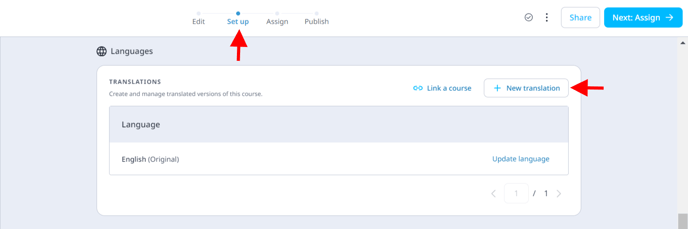
**Step 1: Go to your desired course \> Set up \> Languages \> New Translation**
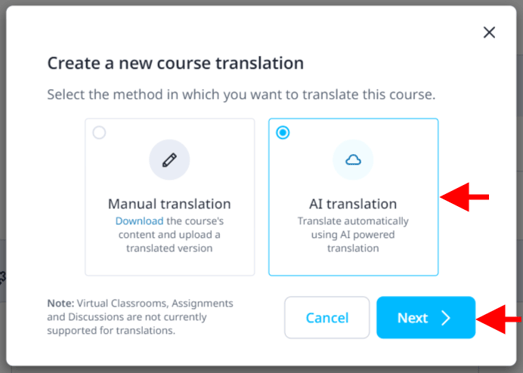
**Step 2: Select AI Translation \> Next**
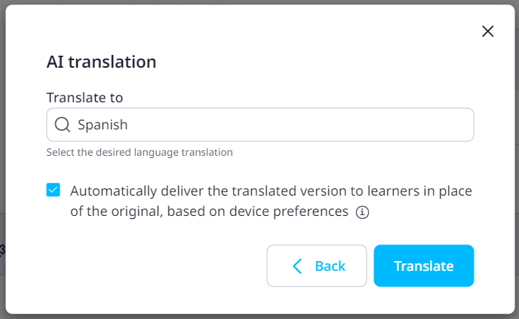
**Step 3: Select your desired language**
Click on **Translate** to proceed with creating a translated version of your course. You'll have the option to *link* this version to the original course.
**What does a linked course mean?**
When a translated version of a course is *linked* to the original, your learners can access the content in whichever language their device is set to (provided this language is available in the linked translations), you won’t need to do anything other than link this version for it to be delivered to the learner automatically.
You’ll see the option to enable this in the image above '**Automatically deliver the translated version to learners in place of the original**', this will be ticked by default so you won’t have to do a thing!
Those users who have the original course assigned to their user group will see whichever translated course is relevant to them.
**Note:** Editing the course with the original language will not reflect in any of the translated courses. The user will have to translate the course again after the edits have been made.
#### **How to link a course**
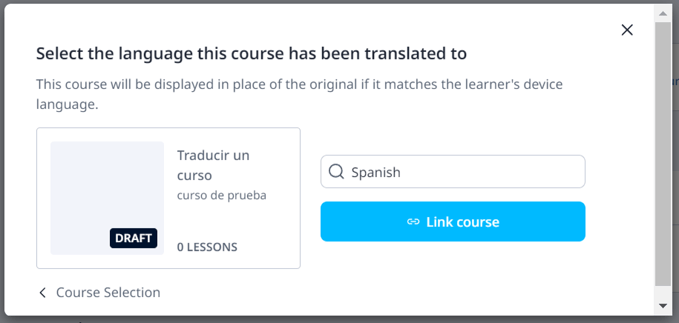
If you’ve created a separate course in a separate language, head over to the original version of the course (English version). Select **Set Up \> Languages**, and you’ll see the following options to link:
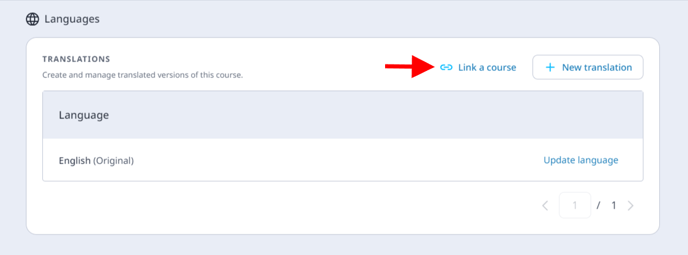
Click ‘**Link a course**’, and your desired course to link. You’ll be prompted to choose the language this course is being delivered in, once you’ve chosen, hit ‘link this course’ and you’re all set!
#### **Unlinking a Course**
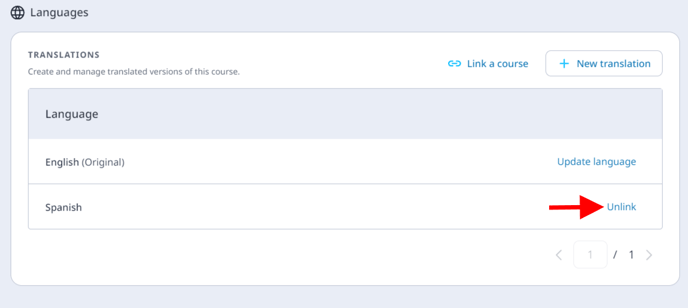
Go to the original course \> **Set Up \> Languages** \> click on the link-breaking button shown below
**When adding access rules, these will need to be set through the original version of the course and will apply to all linked translations.**
- [Getting started](https://support.edapp.com/getting-started?hsLang=en#main-content)
- [Get Started in 5 Minutes](https://support.edapp.com/getting-started?hsLang=en#get-started-in-5-minutes)
- [Lessons & Courses](https://support.edapp.com/getting-started?hsLang=en#lessons-courses)
- [Basic User Management](https://support.edapp.com/getting-started?hsLang=en#basic-user-management)
- [Course Library](https://support.edapp.com/getting-started?hsLang=en#course-library)
- [Definitions](https://support.edapp.com/getting-started?hsLang=en#definitions)
- [Admin portal](https://support.edapp.com/admin-portal?hsLang=en#main-content)
- [Advanced User Management](https://support.edapp.com/admin-portal?hsLang=en#advanced-user-management)
- [Lesson Management](https://support.edapp.com/admin-portal?hsLang=en#lesson-management)
- [Course Management](https://support.edapp.com/admin-portal?hsLang=en#course-management)
- [App Customisation](https://support.edapp.com/admin-portal?hsLang=en#app-customisation)
- [Peer Learning](https://support.edapp.com/admin-portal?hsLang=en#peer-learning)
- [Engagement](https://support.edapp.com/admin-portal?hsLang=en#engagement)
- [Analytics](https://support.edapp.com/admin-portal?hsLang=en#analytics)
- [Features](https://support.edapp.com/admin-portal?hsLang=en#features)
- [EducateAll](https://support.edapp.com/admin-portal?hsLang=en#educateall)
- [Sharing Content](https://support.edapp.com/admin-portal?hsLang=en#sharing-content)
- [Integrations](https://support.edapp.com/admin-portal?hsLang=en#integrations)
- [Learner's app](https://support.edapp.com/learners-app?hsLang=en#main-content)
- [Logging In](https://support.edapp.com/learners-app?hsLang=en#logging-in)
- [Taking Courses](https://support.edapp.com/learners-app?hsLang=en#taking-courses)
- [Features For Learners](https://support.edapp.com/learners-app?hsLang=en#features-for-learners)
- [Extras](https://support.edapp.com/learners-app?hsLang=en#extras)
- [Star Bar](https://support.edapp.com/learners-app?hsLang=en#star-bar)
- [Creator Tool](https://support.edapp.com/creator-tool?hsLang=en#main-content)
- [Branding](https://support.edapp.com/creator-tool?hsLang=en#branding)
- [Templates](https://support.edapp.com/creator-tool?hsLang=en#templates)
- [Course & Lesson Configurations](https://support.edapp.com/creator-tool?hsLang=en#course-lesson-configurations)
- [Copying Slides/Lessons/Courses](https://support.edapp.com/creator-tool?hsLang=en#copying-slides-lessons-courses)
- [Translations](https://support.edapp.com/creator-tool?hsLang=en#translations)
- [Content](https://support.edapp.com/creator-tool?hsLang=en#content)
- [Tips and tricks](https://support.edapp.com/tips-and-tricks?hsLang=en#main-content)
- [Learning Programme Management](https://support.edapp.com/tips-and-tricks?hsLang=en#learning-programme-management)
- [Authoring](https://support.edapp.com/tips-and-tricks?hsLang=en#authoring)
- [Best Practices](https://support.edapp.com/tips-and-tricks?hsLang=en#best-practices)
- [Programme Success](https://support.edapp.com/tips-and-tricks?hsLang=en#programme-success)
- [Engagement](https://support.edapp.com/tips-and-tricks?hsLang=en#engagement)
- [Launch Kit](https://support.edapp.com/tips-and-tricks?hsLang=en#launch-kit)
- [FAQ](https://support.edapp.com/faq?hsLang=en#main-content)
- [Lessons & Courseware](https://support.edapp.com/faq?hsLang=en#lessons-courseware)
- [Authoring](https://support.edapp.com/faq?hsLang=en#authoring)
- [User Registration & Management](https://support.edapp.com/faq?hsLang=en#user-registration-management)
- [Display](https://support.edapp.com/faq?hsLang=en#display)
- [Engagement](https://support.edapp.com/faq?hsLang=en#engagement)
- [Peer Learning](https://support.edapp.com/faq?hsLang=en#peer-learning)
- [Knowledge Performance](https://support.edapp.com/faq?hsLang=en#knowledge-performance)
- [Analytics](https://support.edapp.com/faq?hsLang=en#analytics)
- [System & Technical Support](https://support.edapp.com/faq?hsLang=en#system-technical-support)
- [Subscriptions & Pricing](https://support.edapp.com/faq?hsLang=en#subscriptions-pricing)
- [Educate All](https://support.edapp.com/faq?hsLang=en#educate-all)
- [Contact & Support](https://support.edapp.com/faq?hsLang=en#contact-support)
- [Webinars](https://support.edapp.com/webinars?hsLang=en)
- [Technical / API documentation](https://support.edapp.com/technical-api-documentation?hsLang=en#main-content)
- [Single Sign On for the Learner's Portal](https://support.edapp.com/technical-api-documentation?hsLang=en#single-sign-on-for-the-learners-portal)
- [Single Sign-on for Admin Portal](https://support.edapp.com/technical-api-documentation?hsLang=en#single-sign-on-for-admin-portal)
- [Integrations](https://support.edapp.com/technical-api-documentation?hsLang=en#integrations)
- [API](https://support.edapp.com/technical-api-documentation?hsLang=en#api)
- [Legal documentation](https://support.edapp.com/legal-documentation?hsLang=en#main-content)
- [Third Party Gateway](https://support.edapp.com/legal-documentation?hsLang=en#third-party-gateway)
- [Privacy & Terms](https://support.edapp.com/legal-documentation?hsLang=en#privacy-terms)
- [Troubleshooting](https://support.edapp.com/troubleshooting?hsLang=en)
- [EdApp to SC Migration](https://support.edapp.com/edapp-to-sc-migration?hsLang=en)
- [Default HubSpot Blog](https://edapp-5741180.hs-sites.com/blog)
[](http://edapp.com)
EdApp Help Center
Copyright © 2026, EdApp Pty Ltd