---
title: Offline Mode
description: How to set up offline mode to allow learners to access EdApp wherever they are.
---
[Skip to content](https://support.edapp.com/offline-mode#main-content)
English
Show submenu for translations
![EdApp - logo dark mode-1.png\]](https://support.edapp.com/hs-fs/hubfs/EdApp%20-%20logo%20dark%20mode-1.png?height=40&name=EdApp%20-%20logo%20dark%20mode-1.png)
- [Default HubSpot Blog](https://edapp-5741180.hs-sites.com/blog)
Open main navigation
Close main navigation
- [Default HubSpot Blog](https://edapp-5741180.hs-sites.com/blog)
- English
Show submenu for translations
- [edapp.com](https://www.edapp.com/)
[edapp.com](https://www.edapp.com/)
Hello. How can we help you?
- There are no suggestions because the search field is empty.
1. [Help Center](https://support.edapp.com/?hsLang=en)
2. [Admin portal](https://support.edapp.com/admin-portal?hsLang=en)
3. [Features](https://support.edapp.com/admin-portal?hsLang=en#features)
# Offline Mode
## How to set up offline mode to allow learners to access EdApp wherever they are.
Offline mode makes it easy for learners to complete their courseware, regardless of whether they have a current WiFi or data connection. If this setting is turned on, learners will be able to continue their lessons regardless, with their progress syncing when they re-enter a WiFi or data zone.
### Contents
[Enabling offline mode as an admin](https://support.edapp.com/offline-mode#enable-as-admin)
[Unavailable templates & features](https://support.edapp.com/offline-mode#unavailable)
[Learner's view](https://support.edapp.com/offline-mode#learner-view)
### **Enable Offline Mode in App Settings **
Navigate to the More Tab and ensure 'Offline Mode' is ticked.
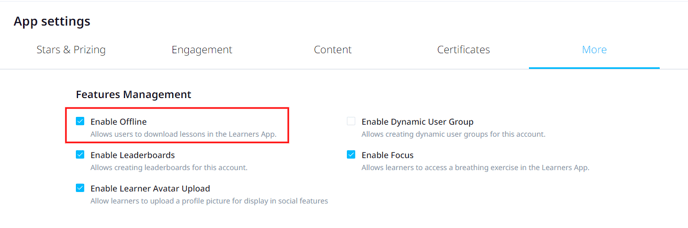
Having this turned on in your account does not mean that it will download all lessons for all users. The user still needs to download the lessons they require on their own app.
### **Unavailable for Offline 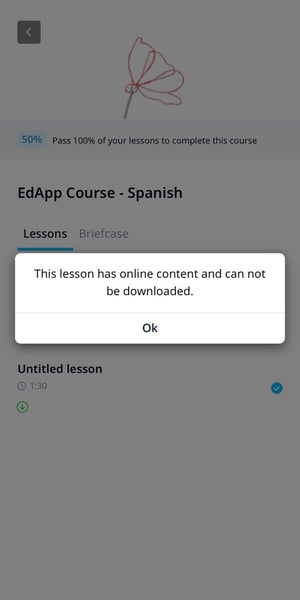**
The following features and templates are not supported for offline downloading:
- External URLs
- SCORM
- AICC
- Video / Video Collections (if 'Play on Demand' setting is enabled)
- YouTube
- Vimeo
- Peer Learning
- Briefcase
### Learner's View
#### Download Lesson
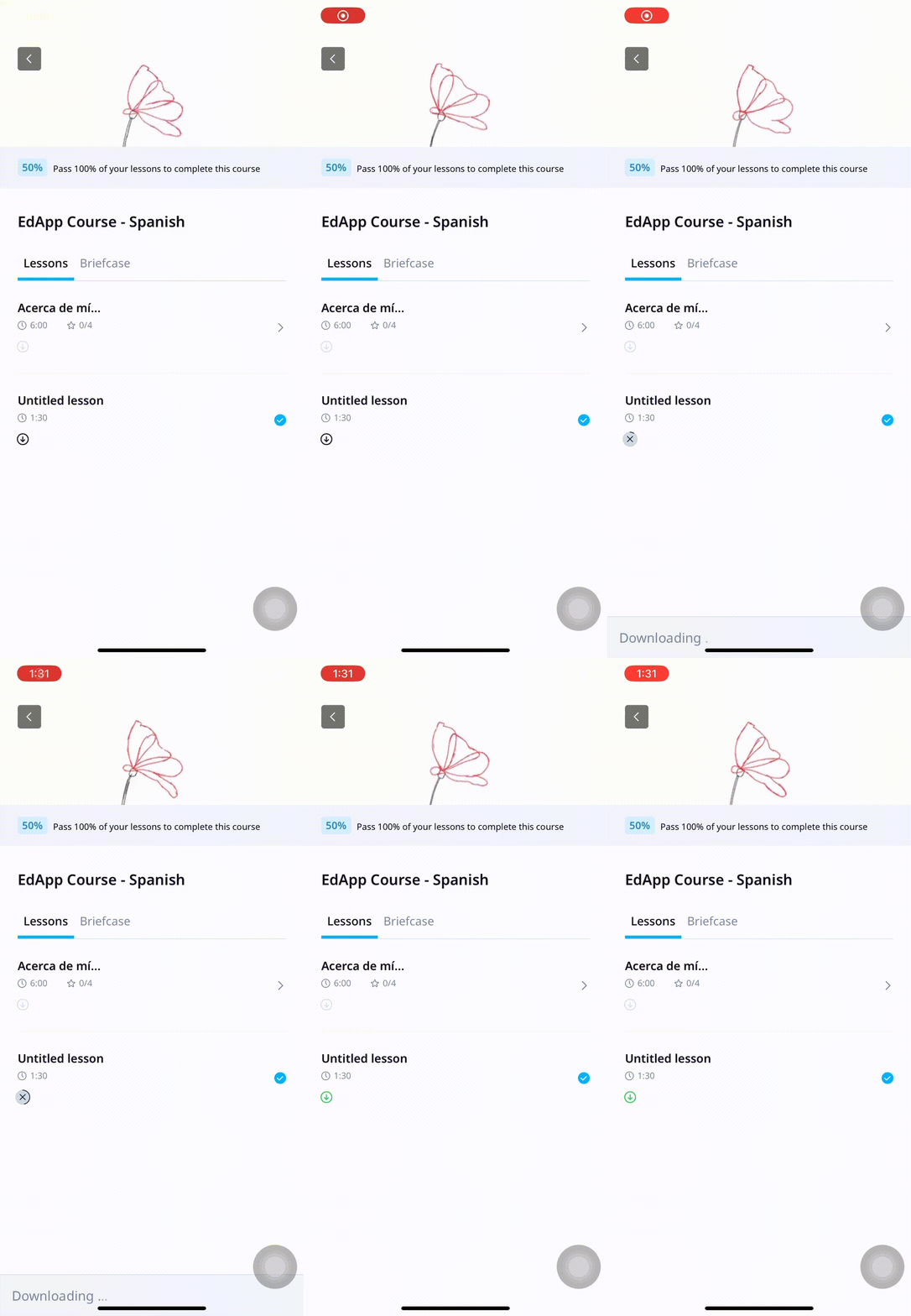
On the learner's app, alongside the lesson name, a download icon will appear that the user can tap to begin downloading each lesson. After tapping the download button, the icon will begin downloading with a circular progress ring around the icon. Once the download is complete, the icon is changed to 'downloaded' and will appear as green.
#### Additional Configuration - **Cancel or remove a download **
If a learner taps the 'X' icon this will cancel the download and return the icon to the initial downloadable icon. This removes the lesson from locally downloaded content.
Lessons will stay downloaded on the device until they are removed by the learner OR if you log out of the learner's app
#### **Allow Cellular Data Downloads**
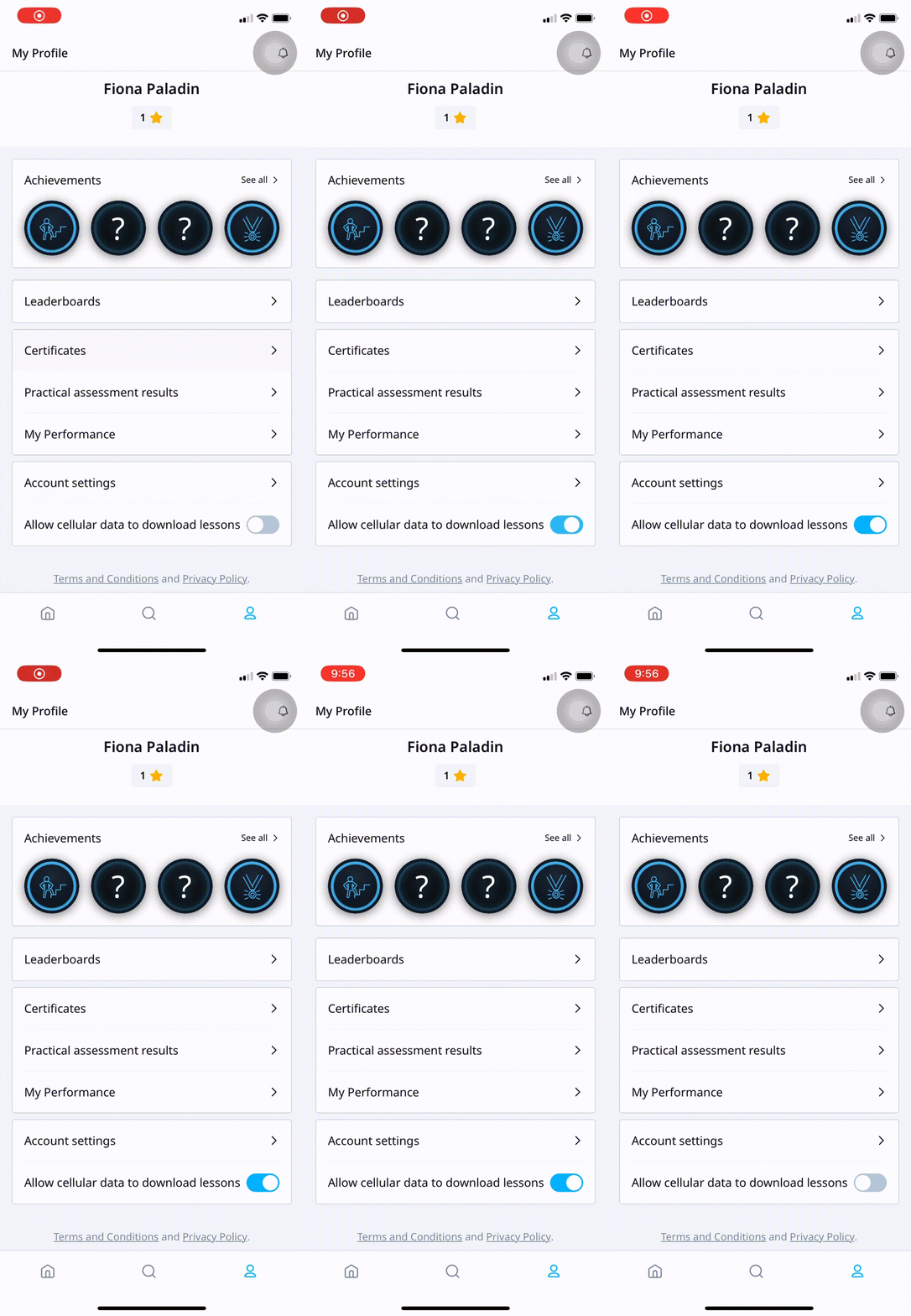
Learners have the option to use cellular data to download their lessons, in addition to WiFi. This can be configured by the learner under 'My Profile.'
- [Getting started](https://support.edapp.com/getting-started?hsLang=en#main-content)
- [Get Started in 5 Minutes](https://support.edapp.com/getting-started?hsLang=en#get-started-in-5-minutes)
- [Lessons & Courses](https://support.edapp.com/getting-started?hsLang=en#lessons-courses)
- [Basic User Management](https://support.edapp.com/getting-started?hsLang=en#basic-user-management)
- [Course Library](https://support.edapp.com/getting-started?hsLang=en#course-library)
- [Definitions](https://support.edapp.com/getting-started?hsLang=en#definitions)
- [Admin portal](https://support.edapp.com/admin-portal?hsLang=en#main-content)
- [Advanced User Management](https://support.edapp.com/admin-portal?hsLang=en#advanced-user-management)
- [Lesson Management](https://support.edapp.com/admin-portal?hsLang=en#lesson-management)
- [Course Management](https://support.edapp.com/admin-portal?hsLang=en#course-management)
- [App Customisation](https://support.edapp.com/admin-portal?hsLang=en#app-customisation)
- [Peer Learning](https://support.edapp.com/admin-portal?hsLang=en#peer-learning)
- [Engagement](https://support.edapp.com/admin-portal?hsLang=en#engagement)
- [Analytics](https://support.edapp.com/admin-portal?hsLang=en#analytics)
- [Features](https://support.edapp.com/admin-portal?hsLang=en#features)
- [EducateAll](https://support.edapp.com/admin-portal?hsLang=en#educateall)
- [Sharing Content](https://support.edapp.com/admin-portal?hsLang=en#sharing-content)
- [Integrations](https://support.edapp.com/admin-portal?hsLang=en#integrations)
- [Learner's app](https://support.edapp.com/learners-app?hsLang=en#main-content)
- [Logging In](https://support.edapp.com/learners-app?hsLang=en#logging-in)
- [Taking Courses](https://support.edapp.com/learners-app?hsLang=en#taking-courses)
- [Features For Learners](https://support.edapp.com/learners-app?hsLang=en#features-for-learners)
- [Extras](https://support.edapp.com/learners-app?hsLang=en#extras)
- [Star Bar](https://support.edapp.com/learners-app?hsLang=en#star-bar)
- [Creator Tool](https://support.edapp.com/creator-tool?hsLang=en#main-content)
- [Branding](https://support.edapp.com/creator-tool?hsLang=en#branding)
- [Templates](https://support.edapp.com/creator-tool?hsLang=en#templates)
- [Course & Lesson Configurations](https://support.edapp.com/creator-tool?hsLang=en#course-lesson-configurations)
- [Copying Slides/Lessons/Courses](https://support.edapp.com/creator-tool?hsLang=en#copying-slides-lessons-courses)
- [Translations](https://support.edapp.com/creator-tool?hsLang=en#translations)
- [Content](https://support.edapp.com/creator-tool?hsLang=en#content)
- [Tips and tricks](https://support.edapp.com/tips-and-tricks?hsLang=en#main-content)
- [Learning Programme Management](https://support.edapp.com/tips-and-tricks?hsLang=en#learning-programme-management)
- [Authoring](https://support.edapp.com/tips-and-tricks?hsLang=en#authoring)
- [Best Practices](https://support.edapp.com/tips-and-tricks?hsLang=en#best-practices)
- [Programme Success](https://support.edapp.com/tips-and-tricks?hsLang=en#programme-success)
- [Engagement](https://support.edapp.com/tips-and-tricks?hsLang=en#engagement)
- [Launch Kit](https://support.edapp.com/tips-and-tricks?hsLang=en#launch-kit)
- [FAQ](https://support.edapp.com/faq?hsLang=en#main-content)
- [Lessons & Courseware](https://support.edapp.com/faq?hsLang=en#lessons-courseware)
- [Authoring](https://support.edapp.com/faq?hsLang=en#authoring)
- [User Registration & Management](https://support.edapp.com/faq?hsLang=en#user-registration-management)
- [Display](https://support.edapp.com/faq?hsLang=en#display)
- [Engagement](https://support.edapp.com/faq?hsLang=en#engagement)
- [Peer Learning](https://support.edapp.com/faq?hsLang=en#peer-learning)
- [Knowledge Performance](https://support.edapp.com/faq?hsLang=en#knowledge-performance)
- [Analytics](https://support.edapp.com/faq?hsLang=en#analytics)
- [System & Technical Support](https://support.edapp.com/faq?hsLang=en#system-technical-support)
- [Subscriptions & Pricing](https://support.edapp.com/faq?hsLang=en#subscriptions-pricing)
- [Educate All](https://support.edapp.com/faq?hsLang=en#educate-all)
- [Contact & Support](https://support.edapp.com/faq?hsLang=en#contact-support)
- [Webinars](https://support.edapp.com/webinars?hsLang=en)
- [Technical / API documentation](https://support.edapp.com/technical-api-documentation?hsLang=en#main-content)
- [Single Sign On for the Learner's Portal](https://support.edapp.com/technical-api-documentation?hsLang=en#single-sign-on-for-the-learners-portal)
- [Single Sign-on for Admin Portal](https://support.edapp.com/technical-api-documentation?hsLang=en#single-sign-on-for-admin-portal)
- [Integrations](https://support.edapp.com/technical-api-documentation?hsLang=en#integrations)
- [API](https://support.edapp.com/technical-api-documentation?hsLang=en#api)
- [Legal documentation](https://support.edapp.com/legal-documentation?hsLang=en#main-content)
- [Third Party Gateway](https://support.edapp.com/legal-documentation?hsLang=en#third-party-gateway)
- [Privacy & Terms](https://support.edapp.com/legal-documentation?hsLang=en#privacy-terms)
- [Troubleshooting](https://support.edapp.com/troubleshooting?hsLang=en)
- [EdApp to SC Migration](https://support.edapp.com/edapp-to-sc-migration?hsLang=en)
- [Default HubSpot Blog](https://edapp-5741180.hs-sites.com/blog)
[](http://edapp.com)
EdApp Help Center
Copyright © 2026, EdApp Pty Ltd